

Every device connected to the internet faces some level of security risk. Hackers can scan networks, send malicious traffic, exploit vulnerable services, or try to gain unauthorized access to computers and servers. One of the most important security tools used to control this traffic is a firewall.
A firewall acts as a barrier between a trusted network and potentially dangerous traffic from outside. It examines network connections and decides whether traffic should be allowed or blocked according to a set of security rules.
Firewalls are used on home computers, business networks, servers, cloud platforms, and network devices. They don’t stop every type of cyberattack by themselves, but they provide an important layer of protection.
In this article, we’ll explain what a firewall is, how a firewall works, different types of firewalls, what attacks firewalls can help stop, and how to configure a firewall safely.
What Is a Firewall?
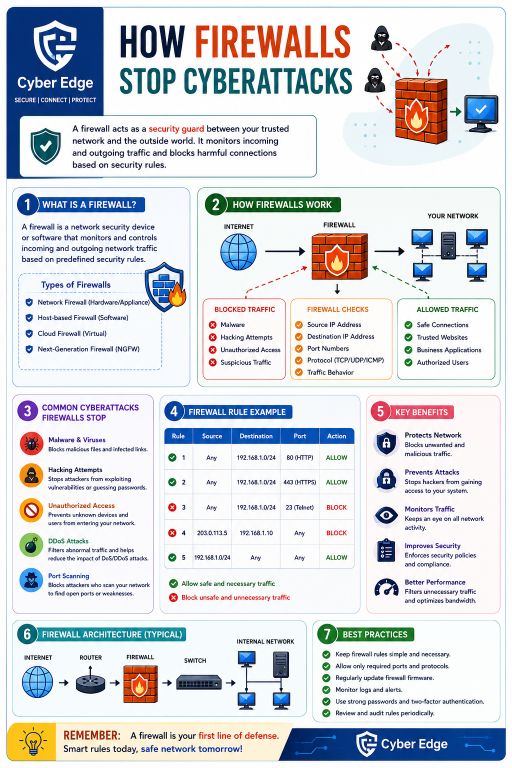
A firewall is a security system that monitors incoming and outgoing network traffic and applies predefined rules to that traffic.
Think of a firewall as a security guard standing at the entrance to a building. The guard checks who is trying to enter and decides whether they should be allowed inside. A firewall performs a similar job for network connections.
When data tries to enter or leave a network, the firewall examines information such as the source address, destination address, port number, protocol, and connection behavior. If the traffic matches an allowed rule, it can pass. If it violates a blocking rule or appears suspicious, the firewall can reject it.
This is why a firewall is often considered one of the first lines of defense for a computer network.
How Does a Firewall Work?
Understanding how firewalls work becomes easier when you think about internet traffic as a series of network connections.
Suppose your computer wants to connect to a website. The request travels through the network and reaches the firewall. Before allowing the connection, the firewall checks it against its security rules.
A firewall may examine:
- Source IP address
- Destination IP address
- Source and destination ports
- Network protocol
- Connection state
- Traffic behavior
- Application information, depending on the firewall
For example, a firewall might allow HTTPS traffic on port 443 but block Telnet traffic on port 23.
The firewall then makes a decision based on its configuration. Safe and authorized traffic can continue, while unwanted traffic is blocked.
What Can a Firewall Block?
A firewall can help block several types of unwanted network activity.
Unauthorized Access
Firewalls can prevent unknown devices or users from connecting to protected systems when the connection doesn’t meet the configured security rules.
Malicious Network Traffic
A firewall can block certain known or suspicious traffic patterns, reducing the chances of malicious connections reaching internal systems.
Port Scanning
Attackers often scan networks looking for open ports and vulnerable services. Proper firewall rules can limit unnecessary access to network ports and make this type of reconnaissance more difficult.
Some Denial-of-Service Traffic
Firewalls can filter certain abnormal traffic patterns and help reduce the impact of some denial-of-service attacks. However, a firewall alone cannot stop every large-scale DDoS attack, particularly when the attack volume exceeds the network’s capacity.
Types of Firewalls
There isn’t just one type of firewall. Different environments use different firewall technologies depending on their security requirements.
Network Firewall
A network firewall is typically placed between networks, such as between the internet and an organization’s internal network.
It can control traffic entering and leaving the network and is commonly deployed as a dedicated hardware appliance or virtual system.
Host-Based Firewall
A host-based firewall runs directly on an individual computer or server.
Windows Firewall is a common example. It can control connections to and from that particular device rather than managing an entire network.
Host-based firewalls are useful because they provide another layer of protection even when a device is connected to a network that has its own firewall.
Cloud Firewall
A cloud firewall protects workloads and resources hosted in cloud environments. Instead of being installed on a physical computer, the firewall is provided through cloud infrastructure or security services.
Cloud firewalls can control traffic between cloud resources and external networks.
Next-Generation Firewall
A next-generation firewall (NGFW) provides more advanced inspection and security capabilities than traditional packet filtering.
Depending on the product, it may inspect applications, identify users, detect threats, and integrate with intrusion prevention and other security technologies.
These firewalls are commonly used by organizations with more complex security requirements.
What Is a Firewall Rule?
A firewall rule tells the firewall what to do when specific network traffic is detected.
For example, a rule might say:
Allow: HTTPS traffic to a web server.
Another rule could say:
Block: Telnet traffic to internal systems.
Rules can include conditions such as source IP, destination IP, port, protocol, and direction.
A simple firewall configuration might allow necessary web traffic while blocking unnecessary services. The goal isn’t to block everything. Instead, the goal is to allow legitimate traffic while restricting connections that aren’t needed.
Why Are Firewall Rules Important?
Poorly configured rules can weaken network security.
For example, opening unnecessary ports can expose services to attackers. On the other hand, blocking required traffic can prevent legitimate applications from working.
Good firewall configuration follows the principle of least privilege. Only the connections that are actually required should be allowed.
Firewall rules should also be reviewed regularly because network requirements change over time.
Benefits of Using a Firewall
A properly configured firewall provides several important security benefits.
Protects Network Devices
A firewall can reduce unwanted connections reaching computers, servers, and other network devices.
Controls Network Traffic
It gives administrators control over which types of traffic can enter or leave a network.
Reduces Attack Surface
Blocking unnecessary ports and services makes fewer network entry points available to attackers.
Helps Enforce Security Policies
Organizations can use firewall rules to control network access according to internal security requirements.
Provides Visibility
Many firewalls maintain logs that show blocked and allowed connections. These logs can help administrators investigate suspicious activity and troubleshoot network problems.
Does a Firewall Stop All Cyberattacks?
No.
This is an important point. A firewall is an important security layer, but it is not a complete cybersecurity solution.
A firewall may not stop an attack if a user willingly downloads malware, enters credentials into a phishing website, or runs a malicious program that is already inside the network.
Modern attacks can also use encrypted connections, stolen credentials, application vulnerabilities, and social engineering.
For this reason, firewalls should be combined with antivirus or endpoint protection, software updates, strong passwords, multi-factor authentication, secure backups, and user awareness.
Firewall Best Practices
If you want to improve firewall security, follow a few basic practices.
Keep firewall software and firmware updated so known security vulnerabilities can be addressed.
Only allow ports and protocols that are actually required. Closing unnecessary services reduces the number of ways attackers can interact with your systems.
Review firewall rules regularly. Old rules created for applications or devices that are no longer used should be removed.
Monitor firewall logs and investigate unusual connection attempts. A sudden increase in blocked traffic can sometimes indicate scanning or other suspicious activity.
You should also avoid creating overly broad rules such as allowing all traffic from unknown sources simply because it makes an application work.
Firewall vs Antivirus
A firewall and antivirus software perform different jobs.
A firewall primarily controls network traffic and connections. It determines which communication is allowed or blocked.
Antivirus and endpoint security software focuses more on detecting malicious files, programs, and behavior on the device.
Using both provides better protection than relying on either one alone.
For example, a firewall may block an unauthorized network connection, while antivirus software may detect a malicious program that has already been downloaded.
Final Thoughts
A firewall is one of the most important components of modern network security. It monitors network traffic and uses security rules to decide which connections should be allowed and which should be blocked.
Whether you’re protecting a home computer, business network, server, or cloud environment, a firewall can reduce unwanted access and limit exposure to certain cyber threats.
However, a firewall should not be treated as a complete security solution. The strongest protection comes from using several security layers together. Keep your software updated, use strong authentication, maintain reliable backups, monitor network activity, and configure firewall rules carefully.
Understanding how firewalls stop cyberattacks is a good first step toward building a safer network. A well-configured firewall won’t make a system invulnerable, but it can make it significantly harder for unauthorized traffic and attackers to reach the systems you’re trying to protect.
Also Read:
- What Is a MAC Address?
- Virus vs Worm vs Trojan vs Ransomware: What Is the Difference?
- Why Does My PC Take So Long to Boot? 10 Common Causes and Fixes
- 10 Google Search Tricks That Can Save You Time
- What Is Network Sniffing?
- Program Files vs Program Files (x86): What’s the Difference?
- Your Browser Knows More About You Than You Think
- USB Device Not Recognized in Windows 10/11
- AMD Ryzen CPU Upgrade Guide