
Choosing the right AMD Ryzen processor isn’t just about buying the newest chip. A processor that performs well today should also continue to meet your needs for several years. Whether you’re building a gaming PC, upgrading an older system, or assembling a workstation, selecting the right Ryzen CPU can save you money and delay your next upgrade.
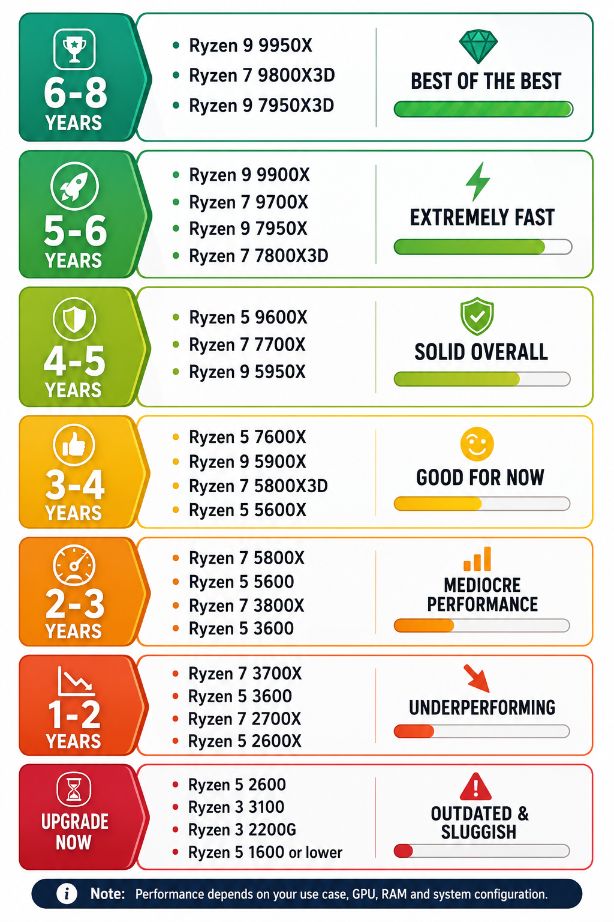
The attached chart groups popular Ryzen processors based on how well they’re expected to perform over the coming years. While no prediction is guaranteed, it provides a practical way to compare CPUs according to their long-term value.
Note: The “years” shown in this guide represent an estimate of how long each processor is likely to remain competitive for typical gaming, productivity, and everyday workloads. Actual lifespan depends on software requirements, graphics card, RAM, and how you use your PC.
Best Ryzen CPUs for Long-Term Performance (6–8 Years)
If you’re building a premium PC and want to avoid upgrading for many years, these processors are among AMD’s strongest choices.
Recommended CPUs
- Ryzen 9 9950X
- Ryzen 7 9800X3D
- Ryzen 9 7950X3D
These processors offer excellent multi-core performance and are powerful enough for demanding workloads like:
- 4K gaming
- Video editing
- 3D rendering
- Software development
- Virtual machines
- AI workloads
- Content creation
For gamers, the X3D models are especially attractive because of AMD’s large 3D V-Cache, which improves gaming performance in many titles.
Excellent Choices for 5–6 Years
These processors provide flagship-level performance at a lower price than the absolute top models.
Recommended CPUs
- Ryzen 9 9900X
- Ryzen 7 9700X
- Ryzen 9 7950X
- Ryzen 7 7800X3D
They can comfortably handle:
- AAA gaming
- Streaming
- Professional productivity
- Heavy multitasking
- Creative applications
The Ryzen 7 7800X3D remains one of the best gaming processors available thanks to its outstanding gaming performance.
Strong Mid-Range CPUs (4–5 Years)
If you want excellent performance without spending on a flagship processor, these CPUs remain solid options.
Recommended CPUs
- Ryzen 5 9600X
- Ryzen 7 7700X
- Ryzen 9 5950X
These processors are ideal for:
- 1080p gaming
- 1440p gaming
- Office work
- Programming
- Content creation
- Everyday multitasking
Most users will find this category offers an excellent balance between price and performance.
Still Good for Most Users (3–4 Years)
These processors continue to perform well today but may begin showing their age in demanding applications over the next few years.
Recommended CPUs
- Ryzen 5 7600X
- Ryzen 9 5900X
- Ryzen 7 5800X3D
- Ryzen 5 5600X
They’re suitable for:
- Modern games
- General productivity
- Photo editing
- Streaming
- Home office use
If you already own one of these CPUs, upgrading immediately may not provide a significant improvement unless your workload has increased.
Aging but Still Capable (2–3 Years)
These processors remain usable, especially when paired with a capable graphics card.
Recommended CPUs
- Ryzen 7 5800X
- Ryzen 5 5600
- Ryzen 7 3800X
- Ryzen 5 3600
They can still handle:
- Casual gaming
- Office applications
- Web browsing
- Media consumption
- Light editing
However, newer processors offer noticeable gains in efficiency, gaming performance, and productivity.
Showing Their Age (1–2 Years)
These CPUs can still perform everyday tasks but may struggle with the latest games and demanding software.
Recommended CPUs
- Ryzen 7 3700X
- Ryzen 5 3600
- Ryzen 7 2700X
- Ryzen 5 2600X
You may notice:
- Longer loading times
- Lower frame rates in newer games
- Slower rendering
- Reduced multitasking performance
Users who regularly edit videos or play modern AAA games should consider planning an upgrade.
Upgrade Recommended
If your PC uses one of these processors, upgrading can provide a noticeable improvement in overall responsiveness.
Older CPUs
- Ryzen 5 2600
- Ryzen 3 3100
- Ryzen 3 2200G
- Ryzen 5 1600 and older
These processors can still perform basic computing tasks, including:
- Internet browsing
- Office documents
- Video streaming
However, they often struggle with:
- Newer games
- Video editing
- Heavy multitasking
- Professional workloads
Factors That Affect CPU Longevity
A processor’s useful life depends on more than just its model number. Several other components influence how long your system feels fast.
Graphics Card
A powerful graphics card can extend the useful life of an older CPU, especially for gaming.
RAM Capacity
Modern applications often benefit from 16 GB or 32 GB of memory. Limited RAM can make even a fast processor feel slow.
Storage
Replacing a traditional hard drive with an NVMe SSD dramatically improves system responsiveness.
Cooling
Good cooling helps maintain boost clocks and prevents thermal throttling during heavy workloads.
Software Requirements
As operating systems and applications evolve, newer CPUs gain advantages through architectural improvements and instruction set support.
Should You Upgrade Your Ryzen Processor?
Not everyone needs the latest Ryzen CPU. Consider upgrading if:
- Your processor is consistently running at 100% usage.
- Modern games no longer achieve acceptable frame rates.
- Video editing or rendering takes much longer than expected.
- Your motherboard supports a faster compatible Ryzen processor.
- You’re planning to upgrade to a more powerful graphics card.
If your current system still meets your needs, waiting for another hardware generation can often provide better value.
Gaming vs Productivity CPUs
Not every Ryzen processor is designed for the same type of workload.
For Gaming
The X3D models are usually the best choice because of their large cache, which benefits many modern games.
Popular options include:
- Ryzen 7 7800X3D
- Ryzen 7 9800X3D
- Ryzen 9 7950X3D
For Productivity
Users who regularly work with video editing, software development, CAD, virtualization, or 3D rendering often benefit more from higher core-count processors such as:
- Ryzen 9 9950X
- Ryzen 9 9900X
- Ryzen 9 7950X
Is It Better to Upgrade the CPU or Build a New PC?
The answer depends on your platform.
If you’re using an AM5 motherboard, upgrading to a newer Ryzen processor is usually straightforward and cost-effective.
If you’re on an older platform that also requires a new motherboard and DDR5 memory, building a new system may provide better long-term value.
Final Thoughts
AMD’s Ryzen lineup offers excellent choices across every budget. While flagship processors like the Ryzen 9 9950X and Ryzen 7 9800X3D are built for users who want maximum performance for years to come, mid-range options such as the Ryzen 5 9600X and Ryzen 7 7700X continue to deliver outstanding value.
If you’re already using a Ryzen 5000 or Ryzen 7000 series processor, there’s often no urgent need to upgrade unless your workload has changed. On the other hand, users with older Ryzen 1000- or 2000-series CPUs will likely notice a significant improvement in speed, efficiency, and overall responsiveness by moving to a newer generation.
Also Read: