
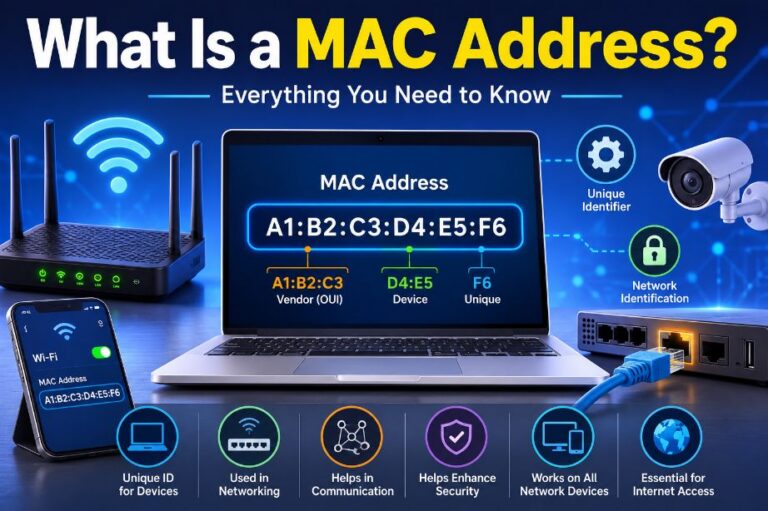
Every device that connects to a network has a unique identifier called a MAC address. Whether you’re using a laptop, smartphone, smart TV, printer, or gaming console, your device has its own MAC address that helps it communicate on a local network.
Although many people are familiar with IP addresses, a MAC address serves a different purpose. While an IP address can change depending on the network you’re connected to, a MAC address is usually tied to the device’s network hardware and remains the same throughout its life.
In this guide, you’ll learn what a MAC address is, how it works, where it’s used, and why it’s important in computer networking.
What Is a MAC Address?
A MAC (Media Access Control) address is a unique hardware identifier assigned to a device’s Network Interface Controller (NIC). It allows devices on the same local network to identify and communicate with one another.
Every network adapter—whether it’s for Ethernet or Wi-Fi—has its own MAC address. This address is used at the Data Link Layer (Layer 2) of the OSI model to ensure data reaches the correct device on a local network.
Unlike an IP address, which can change based on the network configuration, a MAC address is usually permanent and assigned by the device manufacturer.
What Does MAC Stand For?
MAC stands for Media Access Control.
It refers to the part of the networking process responsible for controlling how devices access and communicate over a shared network. The MAC address uniquely identifies the network interface of a device, making it possible for switches, routers, and other networking equipment to deliver data to the correct destination.
MAC Address Format
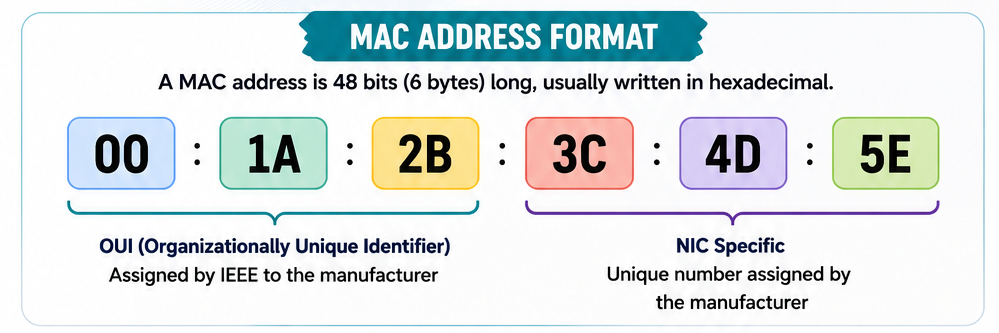
A MAC address is 48 bits (6 bytes) long and is usually written as 12 hexadecimal characters grouped into six pairs.
Example
00:1A:2B:3C:4D:5EOther common formats include:
00-1A-2B-3C-4D-5E
001A.2B3C.4D5E
All three formats represent the same MAC address.
Understanding the Parts of a MAC Address
A MAC address consists of two sections.
Organizationally Unique Identifier (OUI)
The first 24 bits identify the manufacturer of the network adapter.
This portion is assigned by the IEEE (Institute of Electrical and Electronics Engineers).
For example, network adapters made by Intel, Dell, Apple, or TP-Link each have their own assigned OUI ranges.
Device Identifier
The last 24 bits are assigned by the manufacturer.
These numbers make each network adapter unique, even if two devices are made by the same company.
Together, both parts create a globally unique MAC address.
Where Is a MAC Address Used?
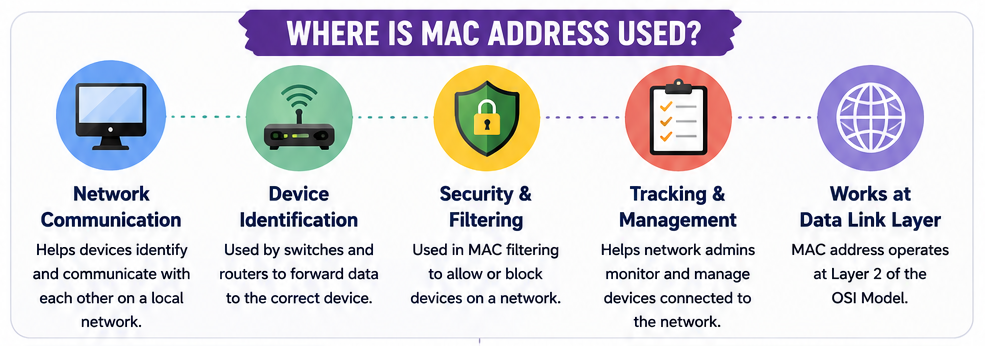
MAC addresses are used whenever devices communicate within a local network.
Network Communication
Switches use MAC addresses to forward data to the correct device on the network instead of broadcasting traffic everywhere.
Device Identification
Routers, switches, and access points identify each connected device using its MAC address.
This allows the network to distinguish between multiple devices, even if they have similar names.
Security and MAC Filtering
Many routers allow administrators to create MAC filtering rules.
These rules can:
- Allow only approved devices to connect
- Block unauthorized devices
- Improve network access control
While MAC filtering adds a layer of security, it should not be relied upon as the only protection because MAC addresses can be spoofed.
Network Monitoring
Network administrators use MAC addresses to:
- Identify connected devices
- Track network activity
- Troubleshoot connectivity problems
- Detect unknown devices
Local Network Communication
MAC addresses are only used within the local network (LAN).
When data travels across the internet, routers rely on IP addresses instead.
Devices That Have MAC Addresses
Almost every device with network connectivity has at least one MAC address.
Examples include:
- Desktop computers
- Laptops
- Smartphones
- Tablets
- Printers
- Smart TVs
- Gaming consoles
- Wi-Fi routers
- Network switches
- IP cameras
- Smart home devices
A device with both Ethernet and Wi-Fi typically has two separate MAC addresses—one for each network interface.
MAC Address vs IP Address
People often confuse MAC addresses with IP addresses, but they serve different purposes.
| MAC Address | IP Address |
|---|---|
| Hardware identifier | Network identifier |
| Usually permanent | Can change |
| Assigned by manufacturer | Assigned by router or ISP |
| Used inside local network | Used across networks and the internet |
| Operates at Layer 2 | Operates at Layer 3 |
Simply put, the MAC address identifies the device, while the IP address identifies where the device is located on a network.
Can a MAC Address Be Changed?
Technically, yes.

Although a MAC address is assigned by the manufacturer, many operating systems allow users to temporarily change or spoof it through software.
People may do this for:
- Privacy protection
- Network testing
- Troubleshooting
- Bypassing MAC filtering (where permitted)
However, the original hardware MAC address remains programmed into the network adapter.
How to Find Your MAC Address
On Windows
- Press Win + R.
- Type cmd and press Enter.
- Run:
ipconfig /all- Look for Physical Address under your network adapter.
On macOS
- Open System Settings.
- Select Network.
- Choose your active connection.
- Open Details to view the MAC address.
On Android
- Open Settings.
- Tap About Phone or About Device.
- Select Status or Wi-Fi.
- View the Wi-Fi MAC Address.
On iPhone
- Open Settings.
- Tap General.
- Select About.
- Scroll down to Wi-Fi Address.
Why Is a MAC Address Important?
Without MAC addresses, devices on a local network wouldn’t know where to send data.
MAC addresses make it possible to:
- Deliver data to the correct device
- Manage connected devices
- Improve network security
- Troubleshoot network problems
- Monitor network activity
- Configure routers and switches
They play a fundamental role in Ethernet and Wi-Fi communication.
Common Misconceptions About MAC Addresses
A MAC address and an IP address are the same.
No. They perform different functions. A MAC address identifies hardware, while an IP address identifies a device’s location on a network.
MAC addresses never change.
The hardware address usually remains the same, but software can temporarily spoof or randomize it for privacy or testing purposes.
MAC addresses work across the internet.
No. MAC addresses are only used within local networks. Internet communication relies on IP addresses.
Every device has only one MAC address.
Not always. Devices with multiple network interfaces, such as Ethernet and Wi-Fi, usually have a separate MAC address for each interface.
Frequently Asked Questions
Is every MAC address unique?
Yes. Manufacturers assign MAC addresses to ensure each network interface has a globally unique identifier.
Can two devices have the same MAC address?
Under normal circumstances, no. However, manually changing (spoofing) a MAC address can create duplicates, which may lead to network conflicts.
Does resetting a computer change its MAC address?
No. Reinstalling Windows or resetting your computer does not change the hardware MAC address.
Is a MAC address private?
A MAC address is generally visible only within your local network. It is not transmitted across the public internet in the same way as an IP address.
Final Thoughts
A MAC address is one of the most important identifiers in computer networking. It allows devices to recognize each other and communicate efficiently within a local network. Unlike an IP address, which can change depending on the network, a MAC address is typically tied to the device’s network hardware and remains the same over time.
Whether you’re setting up a home Wi-Fi network, troubleshooting connectivity issues, or learning the basics of networking, understanding how MAC addresses work provides a solid foundation for managing modern computer networks.
Also Read:
- Your Browser Knows More About You Than You Think
- USB Device Not Recognized in Windows 10/11
- AMD Ryzen CPU Upgrade Guide
- The Weaponization of Doubt: How Cybercriminals Manipulate Trust in the Digital Age
- How Artificial Intelligence Is Changing the Future of Cybercrime
- The Internet Knows You Better Than Your Family