
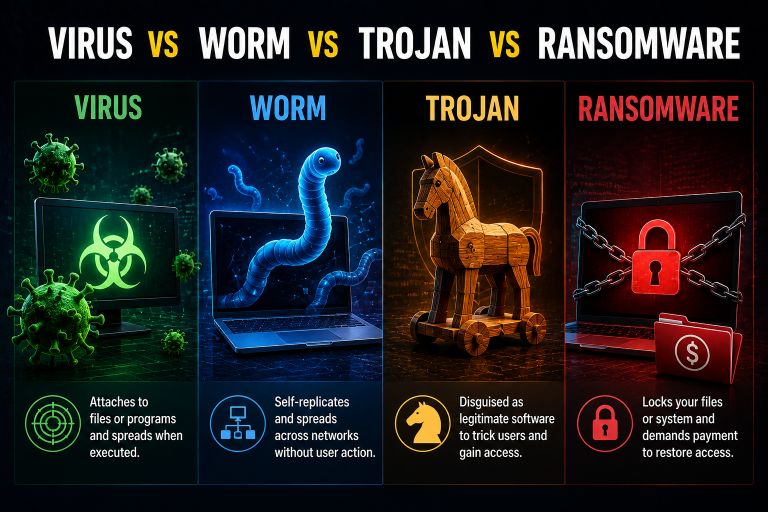
Not all malware behaves in the same way. Some malicious programs attach themselves to other files, some spread automatically across networks, while others trick users into installing them. Ransomware takes a different approach by locking or encrypting files and demanding money from the victim.
This is why terms such as virus, worm, Trojan, and ransomware are sometimes confusing. They all fall under the broader category of malware, but the way they enter a computer, spread, and cause damage can be very different.
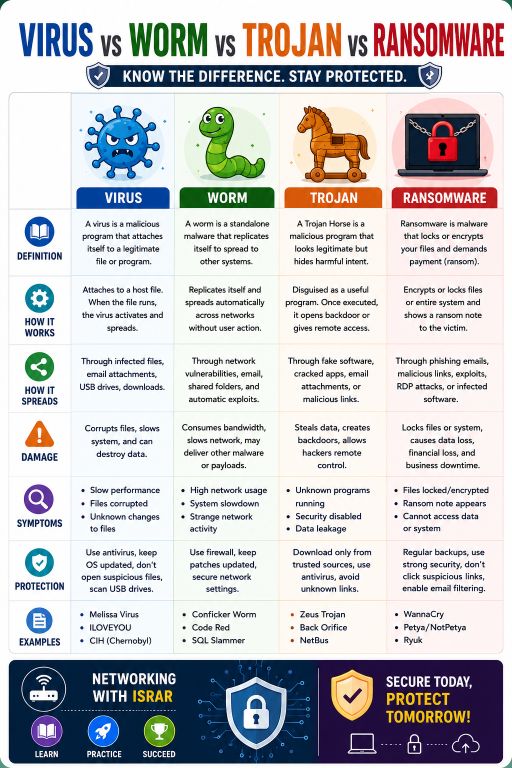
Understanding the difference between a virus vs worm vs Trojan vs ransomware can help you recognize suspicious activity and take the right precautions. In this article, we’ll explain each type in simple language, look at how it works, and discuss how you can protect your computer.
What Is Malware?
Before comparing these threats, it helps to understand what malware means.
Malware is short for malicious software. It refers to software intentionally designed to damage systems, steal information, disrupt operations, spy on users, or give attackers unauthorized access to computers and networks.
Viruses, worms, Trojans, and ransomware are all examples of malware. However, they are not interchangeable terms.
The biggest difference is usually how the malware operates and spreads.
What Is a Computer Virus?
A computer virus is malicious software that attaches itself to a legitimate file or program. When the infected file is opened or executed, the virus can become active and may attempt to infect other files.
This dependency on a host file is one of the main characteristics that separates a traditional virus from a worm.
For example, a user might download an infected executable file from an unsafe source. When the program is opened, the malicious code may run and attempt to modify other files on the computer.
How Does a Computer Virus Spread?
A virus commonly spreads through infected files, email attachments, removable USB drives, downloads, or shared files.
Some viruses can modify other executable files so that the infection continues when those files are opened.
What Damage Can a Virus Cause?
The damage depends on the particular virus. It may:
- Corrupt or modify files
- Delete data
- Slow down the computer
- Display unwanted messages
- Damage system components
- Make other files unusable
Not every infected computer will show obvious symptoms immediately, which makes regular security scans important.
What Is a Computer Worm?
A computer worm is malware that can replicate itself and spread from one computer to another without needing to attach itself to another program in the same way a traditional virus does.
This ability to spread automatically makes worms particularly dangerous on connected networks.
A worm may take advantage of a vulnerability in an operating system, application, or network service. Once it compromises one system, it can attempt to find other vulnerable devices.
How Does a Computer Worm Spread?
A worm can spread through network vulnerabilities, insecure services, email systems, shared folders, or other connected systems.
Unlike a traditional virus, a worm does not necessarily require the user to open an infected file for every stage of its spread.
This is one reason computer worms and network security are closely connected.
What Damage Can a Worm Cause?
A worm can consume large amounts of network bandwidth as it searches for additional systems to infect. It can also slow computers down and deliver additional malicious software.
The Conficker worm, for example, became well known for exploiting Windows vulnerabilities and spreading across networks.
What Is a Trojan Horse?
A Trojan horse, commonly called a Trojan, is malware that disguises itself as legitimate or useful software.
The name comes from the famous Trojan Horse story. The basic idea is similar: something appears harmless on the outside but contains something dangerous inside.
For example, a user may download what appears to be a useful application, game, browser extension, or software update. Once installed, the program may perform malicious activities in the background.
How Does a Trojan Work?
Unlike a worm, a Trojan generally does not spread by automatically replicating itself across networks.
Instead, attackers often rely on social engineering to convince users to download or run the malicious program.
A Trojan may be designed to:
- Steal passwords
- Record information
- Download additional malware
- Give attackers unauthorized access
- Monitor activity
- Modify system settings
Some Trojans create a backdoor that allows attackers to control or interact with an infected computer remotely.
How to Avoid Trojan Malware
Be careful when downloading software from unfamiliar websites. Avoid pirated applications, suspicious email attachments, and links claiming that you urgently need to install an unknown update.
Downloading software from trusted sources and keeping security software enabled can significantly reduce the risk.
What Is Ransomware?
Ransomware is malware designed to prevent victims from accessing their files or systems and then demand payment.
In many ransomware attacks, the malware encrypts files so that the victim cannot open them without the appropriate decryption key. The attacker then displays a ransom note explaining what happened and demanding money.
Ransomware can affect individual users, businesses, hospitals, government organizations, and other institutions.
How Does Ransomware Spread?
Ransomware can enter systems through several routes, including:
- Phishing emails
- Malicious links
- Vulnerable software
- Stolen credentials
- Remote Desktop Protocol (RDP) attacks
- Compromised accounts
- Infected downloads
Modern ransomware attacks can be particularly damaging because attackers may steal sensitive information before encrypting files and then threaten to publish the stolen data.
What Damage Can Ransomware Cause?
The most obvious problem is loss of access to files. Important documents, photos, databases, backups, and business records may become unavailable.
Organizations can also experience significant downtime and financial losses while trying to recover their systems.
Virus vs Worm vs Trojan vs Ransomware
The easiest way to understand the difference is to look at how each threat behaves.
A virus attaches itself to a host file or program and becomes active when that infected file is executed. A worm is more independent and can replicate and spread between vulnerable systems, often across networks. A Trojan disguises itself as legitimate software and depends heavily on tricking the user into installing or running it.
Ransomware, on the other hand, is defined mainly by its purpose: restricting access to data or systems and demanding payment. Ransomware can be delivered using different malware techniques, including Trojans and other attack methods.
These categories can sometimes overlap. For example, a malicious program may initially enter a computer as a Trojan and later deploy ransomware. This is why malware classification is not always as simple as choosing one label.
Common Signs of Malware Infection
Knowing the signs of a malware infection can help you respond before the problem becomes worse.
Possible warning signs include:
- Computer suddenly becoming very slow
- Unknown applications appearing
- Frequent crashes or unexpected restarts
- Unusual network activity
- Antivirus protection being disabled unexpectedly
- Browser settings changing without permission
- Files becoming corrupted or inaccessible
- Unknown programs running in the background
- Unusual pop-ups
- A ransom note appearing on the screen
One symptom by itself does not always prove that malware is present. However, several unusual changes occurring together deserve attention.
How to Protect Your Computer From Malware
Good security habits are usually more effective than trying to remove malware after an infection.
Keep Windows and installed applications updated because security updates often fix vulnerabilities that attackers can exploit.
Use reputable antivirus or endpoint security software and keep its protection active. Windows Security provides built-in protection for modern Windows systems.
Be careful with email attachments and links, especially when a message creates a sense of urgency. Attackers frequently use fake invoices, delivery notifications, account warnings, and other convincing messages to trick users.
You should also download applications from trusted sources and avoid pirated or modified software.
For ransomware protection, maintain regular backups of important files. Ideally, keep at least one backup separate from your computer so malware cannot easily encrypt or delete it.
Final Thoughts
The difference between a virus, worm, Trojan, and ransomware mainly comes down to how the malware operates and what it is designed to accomplish.
A virus attaches itself to files, a worm can spread independently between vulnerable systems, a Trojan disguises itself as legitimate software, and ransomware locks or encrypts data to pressure victims into paying.
Understanding virus vs worm vs Trojan vs ransomware is more than a technical exercise. It helps you recognize common attack methods and make better security decisions.
Keep your operating system updated, use trusted security software, avoid suspicious downloads and links, and maintain reliable backups. These simple habits can go a long way toward protecting your files and devices from today’s malware threats.
Also Read:
- What Is a MAC Address?
- Why Does My PC Take So Long to Boot? 10 Common Causes and Fixes
- 10 Google Search Tricks That Can Save You Time
- What Is Network Sniffing?
- Program Files vs Program Files (x86): What’s the Difference?
- Your Browser Knows More About You Than You Think
- USB Device Not Recognized in Windows 10/11
- AMD Ryzen CPU Upgrade Guide