

Most people think of a web browser as nothing more than a tool for opening websites. You type an address, press Enter, and the page appears. It feels like a simple interaction, but there is much more happening behind the scenes. Every time your browser connects to a website, it shares certain details about your device and software so the site can display properly and function as expected. While much of this information serves legitimate purposes, it also creates opportunities for websites, advertisers, and analytics services to learn more about you than you might realize.
Many internet users believe that browsing in Incognito Mode or regularly deleting cookies is enough to stay private online. These features do provide some privacy benefits, but they do not make you invisible. Modern websites rely on sophisticated tracking techniques that go well beyond traditional cookies. Some of these methods can recognize your browser even after you’ve cleared your browsing data or started a private browsing session.
One of the most powerful techniques is known as browser fingerprinting. Instead of storing information on your computer like a cookie, it examines dozens of characteristics about your browser and device to create a profile that is surprisingly unique. Combined with other tracking technologies, this allows websites to recognize returning visitors, personalize content, measure advertising campaigns, and, in some cases, build detailed records of browsing behavior across multiple sites.
Understanding what your browser reveals is not about becoming suspicious of every website you visit. It is about knowing how modern web technology works so you can make informed decisions about your privacy. Once you understand what information is being shared and why, you’ll be in a much better position to control your online footprint without giving up the convenience of the web.
What Information Does Your Browser Reveal?
Basic Information Shared Automatically
Whenever you open a website, your browser immediately exchanges information with the web server. This process happens in milliseconds and is essential for loading pages correctly. Without it, websites would struggle to determine how to display content on different devices or provide the right language and features for each visitor.
Some of the information your browser commonly shares includes the browser name and version, operating system, preferred language, screen resolution, time zone, and device type. For example, a website may recognize that you’re using Firefox on Windows with a 1920×1080 display and automatically optimize the layout for your screen size. If your browser language is set to English, the site can serve English content instead of another language.
Also Read: Corrupted File vs Damaged Storage: What’s the Difference?
Beyond these basic details, browsers may also reveal technical information such as supported fonts, graphics capabilities, hardware specifications, available memory, processor cores, and installed browser extensions. Individually, these details may seem harmless. However, when combined, they can create a highly distinctive profile of your device. Even if thousands of people use the same browser, the exact combination of settings, hardware, and software on your computer is often much less common than you might expect.
Your IP address also plays an important role in this exchange. Although an IP address can change over time, it provides websites with an approximate geographic location and helps establish communication between your device and the server. Together, these technical details help websites identify returning visitors, improve performance, and enhance security.
Why Websites Need Some of This Information
Not every piece of information your browser shares is collected for tracking. In many cases, websites genuinely need certain details to function properly and provide a good user experience.
For example, an online shopping website needs to know your screen size so product pages display correctly on both smartphones and desktop computers. Streaming platforms detect browser capabilities to choose the best video quality for your connection and device. Banking websites examine browser characteristics as part of their fraud detection systems, helping identify suspicious login attempts from unfamiliar devices or unusual locations.
Developers also rely on browser information to troubleshoot technical issues, measure website performance, and ensure compatibility across different operating systems and browsers. Analytics tools use anonymous browser statistics to understand which devices visitors use most often, allowing companies to improve their websites over time.
The challenge arises when this information is collected not just to improve functionality but also to monitor user behavior across multiple websites. As tracking technologies have become more sophisticated, the line between improving user experience and building detailed browsing profiles has become increasingly blurred. This is where browser fingerprinting enters the picture, taking ordinary browser information and turning it into a powerful method of identifying users without relying on traditional cookies.
Browser Fingerprinting Explained
What Is Browser Fingerprinting?
Imagine walking into a room full of people wearing similar clothes. At first glance, everyone looks alike. But if you pay attention to small details—their height, voice, hairstyle, glasses, shoes, and the way they walk—you can often recognize a specific person without asking their name. Browser fingerprinting works in a very similar way.
Instead of relying on a single piece of information, a website collects dozens of characteristics about your browser and device. On their own, these details are fairly common. Millions of people use the same browser or the same operating system. However, when all of these characteristics are combined, they can create a profile that is unique enough to distinguish your browser from many others.
Use Our Tools – Intentionally Corrupt Files
Corrupt PDF File Online Create damaged PDF files for testing and recovery purposes.
Corrupt Word File Online Intentionally corrupt DOC and DOCX files for software testing.
PDF Corruption Tool Generate corrupted PDF documents directly in your browser.
This profile is known as a browser fingerprint. Unlike a traditional cookie, it isn’t stored as a file on your computer. Instead, it is generated each time you visit a website based on how your browser responds to various requests. If you return to the same website later with the same browser configuration, there’s a good chance your fingerprint will look almost identical, making it easier for the website to recognize your browser.
Because browser fingerprinting doesn’t depend on storing data in your browser, it is much harder for users to control. Deleting cookies, clearing browsing history, or opening a private browsing window does not necessarily change your browser’s fingerprint. This is one reason privacy experts consider fingerprinting one of the more persistent forms of online tracking.
It’s worth noting that browser fingerprinting is not inherently malicious. Security services sometimes use it to detect fraudulent logins, prevent account takeovers, and identify automated bots. The concern arises when the same technique is used extensively for advertising, profiling, or tracking users across multiple websites without their clear understanding.
How Browser Fingerprinting Works
A browser fingerprint is created by combining many small pieces of technical information. Think of it as assembling a puzzle where every piece adds a little more detail. The more pieces available, the easier it becomes to identify a browser.
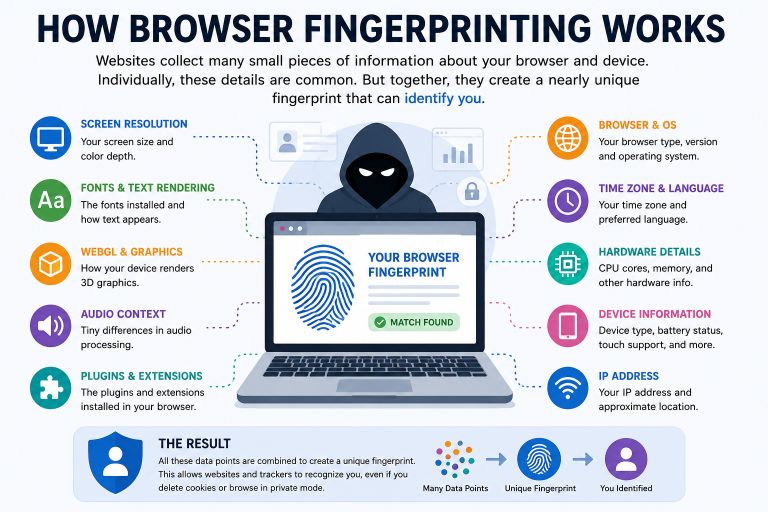
One common technique is Canvas fingerprinting. Modern browsers use an HTML5 feature called Canvas to draw text and graphics. Although two computers may receive the same drawing instructions, the final image can vary slightly depending on the graphics card, operating system, installed fonts, browser version, and graphics drivers. These tiny differences are usually invisible to the human eye, but software can measure them and use the result as part of a browser fingerprint.
Another method is WebGL fingerprinting, which examines how your browser renders three-dimensional graphics. Since graphics hardware and drivers differ from one device to another, the rendered output often contains subtle variations that help distinguish one browser from another.
Some websites also use audio fingerprinting. Browsers process audio using the device’s hardware and software, and the resulting output can differ slightly between systems. By measuring these differences, websites gain another characteristic that contributes to the fingerprint.
Additional information may come from installed fonts, screen resolution, color depth, browser language, time zone, processor cores, available device memory, touch support, browser plugins, and even the list of supported web technologies. None of these factors is unique by itself, but together they can create a surprisingly distinctive digital profile.
Browser extensions can make this profile even more unique. While extensions improve browsing by blocking ads, managing passwords, or enhancing productivity, the specific combination of extensions installed on your browser may differ from most other users. This uniqueness can unintentionally make your browser easier to recognize.
The important point is that browser fingerprinting doesn’t require downloading malware or secretly accessing personal files. It relies on information your browser naturally exposes while interacting with websites. That’s why many users have no idea it’s happening. Everything occurs quietly in the background, often within a fraction of a second after a webpage loads.
As privacy awareness has grown, browser developers have introduced features designed to reduce fingerprinting opportunities. Some browsers limit the amount of device information they expose, while others standardize certain values so that many users appear more alike. These improvements make fingerprinting less reliable, but they haven’t eliminated it completely. Tracking techniques continue to evolve, creating an ongoing balance between website functionality, security, advertising needs, and user privacy.
Cookies vs Browser Fingerprinting
For many years, cookies were the primary technology used to remember visitors online. Today, they still play an important role, but they are no longer the only way websites recognize returning users. Browser fingerprinting has added another layer of tracking that works very differently, which is why understanding the distinction matters.
A cookie is a small text file that a website stores in your browser. It can remember that you’ve signed in, keep items in your shopping cart, save language preferences, or store basic website settings. Cookies improve convenience because they allow websites to remember information between visits. Most browsers also give users control over cookies, making it possible to view, block, or delete them whenever they choose.
Browser fingerprinting takes a completely different approach. Instead of saving information on your device, it identifies your browser by analyzing its characteristics every time you visit a website. There is usually nothing stored locally that you can simply erase. Even after clearing cookies and browsing history, the same browser may still produce a very similar fingerprint if its configuration hasn’t changed.
This difference explains why clearing cookies doesn’t always stop websites from recognizing returning visitors. Many organizations combine both techniques. Cookies provide a reliable way to maintain user sessions and preferences, while browser fingerprinting helps identify browsers when cookies are unavailable or have been deleted.
From a privacy perspective, cookies are generally easier for users to manage because browsers offer built-in controls for them. Browser fingerprinting is less visible and often operates without any obvious indication, making it harder for users to understand when it is being used.
That doesn’t mean cookies are bad or fingerprinting is always harmful. Both technologies have legitimate uses, especially for security and website functionality. The real issue lies in how they are used, how much information is collected, and whether users are given meaningful transparency and control over their data.
Who Tracks Your Browser?
Every time you visit a website, you’re not necessarily interacting with just that website. A single page may load content from advertising networks, analytics platforms, social media services, video providers, and other third-party companies. Each of these services can receive certain information from your browser, depending on how the website is built and the permissions you’ve granted.
Most tracking isn’t done by a single organization. Instead, it often involves multiple services working together to understand how websites are used, measure advertising performance, improve security, or personalize content. Some of these activities are helpful and expected, while others raise important privacy questions.
Advertising Networks
Online advertising has changed dramatically over the past decade. Rather than showing the same advertisement to every visitor, advertising networks aim to display ads that are more relevant to each person. To achieve this, they collect information about browsing behavior, interests, and interactions across different websites.
For example, if you spend time reading articles about cameras, you may begin seeing photography-related advertisements on completely different websites. This happens because advertising platforms can recognize patterns in your browsing activity and use that information to build interest profiles.
Advertising companies often rely on a combination of cookies, browser fingerprinting, and other tracking technologies. Their goal is usually to understand which advertisements were viewed, clicked, or ignored so they can improve future campaigns. While targeted advertising can make ads more relevant, it also means more data is collected about your online behavior.
Analytics Providers
Website owners naturally want to know how visitors use their sites. Which pages are popular? How long do visitors stay? Are people using mobile devices or desktop computers? Analytics platforms help answer these questions.
Most analytics data is used to improve website performance, identify technical problems, and understand visitor trends. For example, if a large percentage of users leave a webpage within a few seconds, the website owner may investigate whether the page loads too slowly or contains confusing information.
Analytics services also collect technical details such as browser type, operating system, screen resolution, and approximate location. In many cases, this information is aggregated rather than focused on individual users. However, depending on how analytics tools are configured, they may still contribute to broader user profiling when combined with other data sources.
Social Media Platforms
Many websites include social media features such as Share, Like, Follow, or embedded posts. Although these features seem simple, they often require your browser to communicate directly with the social media platform providing them.
Also Read: The Weaponization of Doubt: How Cybercriminals Manipulate Trust in the Digital Age
If you’re already logged into a social media account, those platforms may recognize your browser when you visit websites that include their embedded content. Even if you don’t interact with the buttons, your browser may still exchange technical information needed to load them.
This doesn’t automatically mean your entire browsing history is being recorded, but it does illustrate how browsing activity can extend beyond the website you’re actively visiting. Social media companies use these connections to improve their services, measure engagement, and, in some cases, support advertising systems.
Data Brokers
Not all companies collecting browsing information have a direct relationship with the websites you visit. Some organizations specialize in gathering data from multiple sources and combining it into larger consumer profiles.
These companies, often referred to as data brokers, may collect information from advertising platforms, public records, loyalty programs, surveys, mobile apps, and other commercial sources. Their goal is generally to create detailed marketing datasets that can be used for audience segmentation, market research, fraud detection, or business intelligence.
Exactly what information is collected and how it is used depends on local privacy laws, company policies, and user consent requirements. In regions with stronger privacy regulations, organizations may face stricter limits on data collection and greater obligations to inform users about their practices.
Privacy Risks You Should Know
Most websites aren’t trying to steal your personal information, and many tracking technologies exist for legitimate reasons such as improving security, measuring website performance, or keeping users signed in. The concern is that modern tracking can become so extensive that users lose visibility into how much information is being collected and who ultimately has access to it.
One of the biggest concerns is behavioral profiling. Instead of looking at a single website visit, companies can analyze browsing patterns over weeks or months to understand interests, shopping habits, reading preferences, and general online behavior. This information may then be used to personalize advertisements, recommend content, or categorize users into different marketing groups.
Another issue is cross-site tracking. If the same advertising or analytics service appears on many websites, it may be able to observe visits across those sites. Over time, this creates a broader picture of browsing activity than most users expect when simply reading news, shopping online, or researching products.
Modern tracking can also extend across multiple devices. When users sign into the same online accounts on a laptop, smartphone, and tablet, companies may be able to connect activity from these devices to provide a more consistent experience. While this can be convenient—for example, syncing bookmarks or continuing a shopping session—it can also contribute to more comprehensive user profiles.
Data collection becomes especially concerning when large datasets are exposed during a security incident. Even organizations with strong security practices can experience data breaches, and information gathered for advertising or analytics purposes may become part of those incidents. Although browser fingerprints alone don’t reveal sensitive personal files or passwords, combining technical identifiers with other collected information can increase privacy risks.
It’s also important to remember that privacy exists on a spectrum. Some users are comfortable sharing data in exchange for personalized services and free online content. Others prefer to limit tracking wherever possible. Neither approach is inherently right or wrong. What matters most is having enough transparency to make an informed choice about how your information is collected and used.
How to Reduce Browser Tracking
Completely avoiding online tracking is almost impossible. Modern websites depend on a variety of technologies to deliver content, prevent fraud, measure performance, and improve user experience. However, that doesn’t mean you have to accept every form of tracking by default. A few simple changes can significantly reduce the amount of information your browser shares while still allowing you to browse the web comfortably.
Choose a Privacy-Focused Browser
Your browser is your first line of defense. While all modern browsers include security features, some place a stronger emphasis on privacy by limiting trackers and reducing opportunities for browser fingerprinting.
Browsers such as Firefox and Brave include built-in tracking protection that blocks many third-party trackers before they can collect data. They also provide more detailed privacy controls, allowing users to decide how websites handle cookies, location requests, notifications, and other permissions.
No browser can eliminate tracking entirely, but choosing one that prioritizes privacy gives you a stronger starting point than relying on default settings alone.
Block Third-Party Cookies
Many websites use first-party cookies to remember login sessions, shopping carts, or language preferences. These are generally useful and expected. Third-party cookies, however, are often placed by advertising or analytics services that appear across multiple websites.
Blocking third-party cookies can make it more difficult for advertisers to follow your browsing activity from one website to another. Most modern browsers now include settings that either block these cookies by default or allow users to disable them with just a few clicks.
You may occasionally notice that certain websites require adjustments to work correctly, but for most users, blocking third-party cookies has little impact on everyday browsing.
Use Trusted Privacy Extensions
A well-chosen browser extension can add another layer of protection by preventing known tracking scripts from loading.
Extensions like uBlock Origin are widely used to block unwanted advertisements and many tracking requests before they reach your browser. Another popular option, Privacy Badger, learns to identify trackers based on their behavior and automatically limits their ability to follow you across websites.
The key is to install only extensions from reputable developers. Every extension receives certain permissions inside your browser, so adding unnecessary or untrusted extensions may actually reduce your privacy instead of improving it.
Keep Browser Extensions to a Minimum
Ironically, installing too many browser extensions can make your browser easier to identify.
Each extension changes your browser environment slightly. When combined with other characteristics such as screen size, fonts, language settings, and hardware information, a unique combination of extensions may contribute to a more distinctive browser fingerprint.
Review your installed extensions regularly and remove those you no longer use. A cleaner browser is not only faster but may also reveal less about your browsing environment.
Keep Your Browser Updated
Browser updates are often associated with new features, but their most important purpose is security. Developers continuously patch vulnerabilities, improve privacy protections, and strengthen defenses against emerging tracking techniques.
Running an outdated browser may expose you to security risks that have already been fixed in newer versions. Enabling automatic updates ensures you receive these improvements without needing to remember to install them manually.
Review Privacy Settings Regularly
Most people install a browser and never look at its settings again. Taking just a few minutes to review your privacy options can make a noticeable difference.
Check which websites have permission to access your camera, microphone, location, notifications, and clipboard. Remove permissions that are no longer necessary and deny access to websites you don’t fully trust.
It’s also worth reviewing cookie settings, tracking protection options, and saved site permissions every few months. Browsers continue to add new privacy features, and staying familiar with these controls helps you make better decisions about your online privacy.
Also Read: What Is File Corrupter?
The goal isn’t to hide from the internet completely. Instead, it’s about sharing only the information that’s necessary while reducing unnecessary data collection whenever possible.
Common Myths About Browser Privacy
Many online privacy myths continue to circulate, often giving users a false sense of security. Understanding what these tools actually do can help you make better decisions.
One of the biggest misconceptions is that Incognito or Private Browsing Mode makes you anonymous online. In reality, these modes mainly prevent your browser from saving local history, cookies, and search records after you close the session. Websites, internet service providers, employers, and the services you sign into can still see your activity while you’re browsing.
Another common belief is that deleting cookies completely stops online tracking. Clearing cookies certainly removes stored website data, but it doesn’t prevent techniques like browser fingerprinting, which identifies your browser based on its configuration rather than stored files.
Some users also assume that using a VPN blocks browser fingerprinting. A VPN hides your IP address and encrypts your internet connection, which improves privacy in several ways. However, it does not change many of the browser characteristics used for fingerprinting, such as screen resolution, installed fonts, browser version, or hardware capabilities.
Finally, many people think tracking is always malicious. The reality is more balanced. Websites often collect technical information for legitimate reasons like security, fraud prevention, website optimization, and accessibility. The real concern is ensuring that users understand what data is being collected, why it’s needed, and whether they have meaningful control over how it’s used.
Conclusion
Your web browser does much more than display websites. Every visit involves an exchange of technical information that helps pages load correctly, improves security, and enhances your browsing experience. At the same time, these same details can also be used to recognize your browser, measure your online activity, and build profiles for advertising or analytics purposes.
Browser fingerprinting has made online tracking more sophisticated than ever because it doesn’t rely solely on cookies. Instead, it uses the unique combination of your browser and device characteristics to identify returning visitors, making it harder to avoid through traditional privacy measures alone.
The good news is that protecting your privacy doesn’t require advanced technical knowledge. Choosing a privacy-focused browser, limiting unnecessary extensions, blocking third-party cookies, keeping your browser updated, and regularly reviewing your privacy settings can all reduce the amount of information you share online.
The internet isn’t likely to stop collecting data anytime soon, but understanding how your browser works gives you something valuable: the ability to make informed choices. When you know what information is being shared and why, you’re in a much stronger position to decide how much of your digital footprint you want to leave behind.
References
Harvard Kennedy School Belfer Center for Science and International Affairs
https://www.belfercenter.org/topics/science-technology/cyber-security
National Institute of Standards and Technology
Cybersecurity and Infrastructure Security Agency