
When a company discovers that its computer network has been hacked, one of the biggest questions is simple: What exactly happened? Investigators need to find out how the attacker got in, what systems were accessed, what information may have been stolen, and how long the attacker remained inside the network.
This is where digital forensics becomes important.
Digital forensics is the process of collecting, preserving, examining, and analyzing digital evidence from computers, phones, servers, networks, and other devices. It helps investigators reconstruct events that happened in the digital world, often after a security incident or cyberattack.
A digital investigation is not simply about looking through files. Investigators have to carefully preserve evidence, examine system activity, compare timestamps, analyze logs, and document their findings. In some cases, the final report may also be used in legal proceedings.
This article explains what digital forensics is, how digital forensic investigations work, and how investigators reconstruct a cyberattack step by step.
What Is Digital Forensics?
Digital forensics is a branch of forensic investigation that deals with evidence stored or generated by digital devices and computer systems.
The goal is to understand what happened while keeping the evidence reliable and, where necessary, suitable for legal or regulatory use.
Digital forensic investigators may examine:
- Computers and laptops
- Hard drives and SSDs
- Servers
- Mobile devices
- Network traffic
- Email accounts
- Browser history
- System logs
- Cloud systems
- Security alerts
- Deleted files
For example, if an attacker gains unauthorized access to a company’s server, investigators may examine logs and system artifacts to determine when the account was accessed and what happened afterward.
Why Is Digital Forensics Important?
Cyberattacks can leave thousands or even millions of pieces of digital evidence behind. A single security alert rarely explains the complete story.
Digital forensics helps connect those pieces.
An investigation may answer questions such as:
- When did the attack begin?
- How did the attacker gain initial access?
- Which account or device was compromised?
- Which systems were accessed?
- Did the attacker move between systems?
- Was sensitive information accessed?
- What malware or tools were involved?
- What changes were made to the system?
- What evidence can support the investigation?
This information is useful for incident response, security improvements, regulatory investigations, and sometimes legal cases.
How Digital Forensic Investigation Works
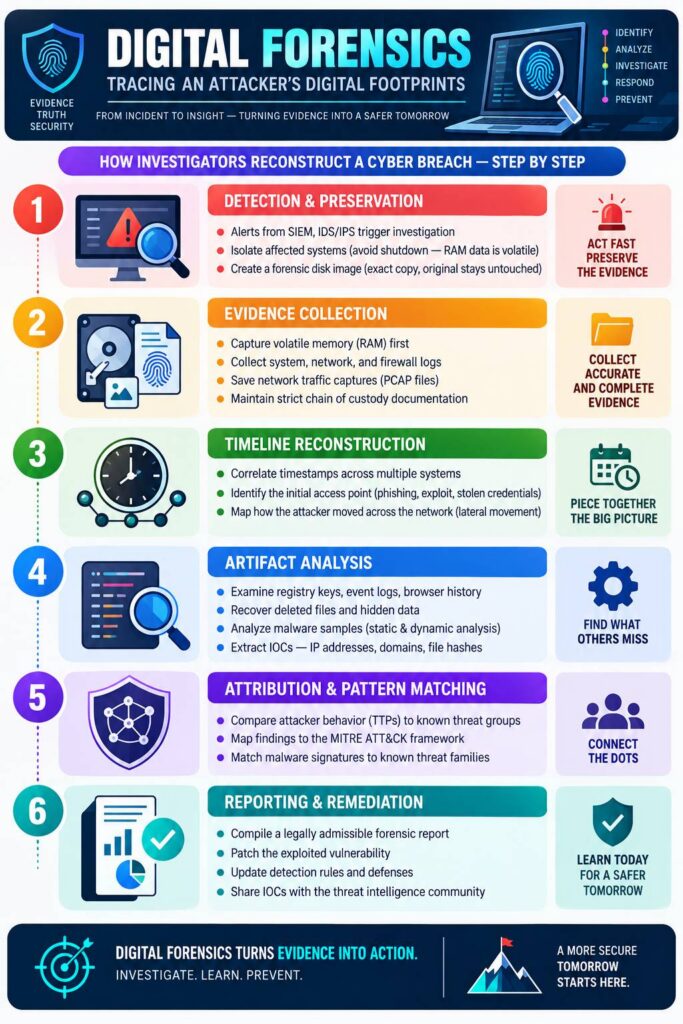
A digital forensic investigation generally follows a structured process. The exact procedure depends on the incident, organization, technology, and legal requirements, but the basic stages are similar.
1. Detection and Evidence Preservation
The investigation usually begins when a security system detects something unusual.
Alerts from security information and event management systems, intrusion detection systems, endpoint security tools, or other monitoring systems may indicate suspicious activity.
Once an incident is identified, investigators try to preserve evidence before it disappears or changes.
This is particularly important for volatile data. Information stored in RAM can disappear when a computer is powered off. Therefore, investigators may need to collect appropriate volatile evidence before shutting down or restarting an affected system.
Investigators may also isolate affected systems to prevent further damage while preserving the evidence needed for analysis.
For storage devices, investigators can create a forensic image, which is a bit-for-bit copy of the relevant media. The original evidence can then be preserved while analysis is performed on the copy.
2. Evidence Collection
The next stage is digital evidence collection.
Investigators collect information that may help explain the incident. This can include system logs, firewall logs, authentication records, network traffic captures, browser artifacts, files, and memory information.
Every piece of evidence needs to be handled carefully. Investigators document where the evidence came from, when it was collected, who handled it, and what was done with it.
This documentation is known as the chain of custody.
Maintaining a proper chain of custody is particularly important when evidence may eventually be presented in court or used during an internal investigation.
3. Timeline Reconstruction
One of the most important parts of digital forensics is creating a timeline.
Attackers rarely perform everything at once. An incident may begin with a phishing email, stolen credentials, or exploitation of a vulnerable service. The attacker may then access another system, move through the network, and eventually attempt to steal or damage data.
Investigators compare timestamps from multiple sources to reconstruct this sequence.
For example, they might compare:
- Login records
- Windows event logs
- Firewall logs
- File modification times
- Email records
- Security alerts
- Network traffic
By putting these events together, investigators can build a clearer picture of the attack.
4. Finding the Initial Access Point
Another important question is how the attacker entered the system.
The initial access point could involve a phishing message, stolen credentials, vulnerable software, a compromised account, or another security weakness.
Investigators examine available evidence to identify the earliest confirmed suspicious activity.
Finding the initial access point is important because simply removing the attacker from one computer may not solve the underlying problem. If the original vulnerability remains, another compromise could occur.
5. Analyzing Digital Artifacts
A digital artifact is a piece of information left behind by an activity or process.
Investigators may examine Windows Registry entries, event logs, browser history, file metadata, application records, scheduled tasks, and other system information.
Deleted files may sometimes be recoverable depending on the storage device and circumstances, although recovery is not guaranteed.
Investigators may also examine suspicious software or malware samples in controlled environments to understand their behavior.
The purpose is to connect individual artifacts and determine what actions occurred on the affected system.
6. Identifying Indicators of Compromise
During an investigation, analysts often identify Indicators of Compromise (IOCs).
An IOC is evidence that may indicate a system has been compromised. Examples can include suspicious IP addresses, domains, file hashes, unusual files, or other technical indicators associated with malicious activity.
These indicators can then be used to search other systems within the organization.
For example, if investigators identify a suspicious file hash on one computer, security teams may check whether the same file exists elsewhere.
This can help determine the size of an incident.
7. Understanding Lateral Movement
Attackers don’t always stay on the first computer they compromise.
After gaining access, they may attempt to reach other systems on the same network. This activity is commonly called lateral movement.
Digital forensic investigators look for evidence showing connections between systems, unusual authentication activity, and other signs that an attacker moved through the environment.
Understanding lateral movement helps investigators determine which machines and accounts may have been affected.
8. Attribution and Pattern Matching
Sometimes investigators try to understand whether an attack resembles activity associated with a known threat group or malware family.
They may compare observed Tactics, Techniques, and Procedures (TTPs) with known threat intelligence and frameworks such as MITRE ATT&CK.
However, attribution is not always straightforward. Similar tools and techniques can be used by different attackers, and technical evidence does not necessarily prove who was behind an incident.
For this reason, investigators generally distinguish confirmed technical evidence from assumptions or attribution assessments.
9. Reporting the Findings
After analyzing the evidence, investigators prepare a detailed digital forensic report.
The report may explain:
- What happened
- When the incident occurred
- How access was obtained
- Which systems were affected
- What evidence was discovered
- What data may have been accessed
- What actions were taken
- What security improvements are recommended
A good forensic report should clearly separate verified facts from interpretations.
The report also provides a record that can help security teams, management, auditors, or legal professionals understand the incident.
10. Remediation and Security Improvements
Digital forensics doesn’t end when the investigation is complete.
The organization must also address the weakness that allowed the attack to happen.
This may involve patching vulnerable software, resetting compromised credentials, removing malicious software, improving firewall rules, updating detection systems, or strengthening access controls.
Investigators may also share appropriate indicators of compromise with security teams or trusted threat intelligence communities so similar activity can be detected elsewhere.
Digital Forensics vs Cybersecurity
Digital forensics and cybersecurity are closely connected, but they are not exactly the same.
Cybersecurity focuses heavily on preventing attacks and protecting systems from threats.
Digital forensics focuses on investigating incidents and understanding what happened using digital evidence.
For example, a firewall may help prevent an unauthorized connection, while digital forensics may later examine firewall logs to determine whether an attacker attempted to connect.
Both areas are important because prevention and investigation work together.
Final Thoughts
Digital forensics plays an important role in understanding cyberattacks. When an incident occurs, investigators need more than a security alert. They need evidence that can help reconstruct the complete sequence of events.
The process typically involves detecting and preserving evidence, collecting relevant data, reconstructing a timeline, examining system artifacts, identifying indicators of compromise, understanding attacker movement, and documenting the findings.
The goal is not simply to find out that a system was hacked. A proper digital forensic investigation tries to answer the bigger questions: how the attacker entered, what they did, which systems were affected, and what can be done to prevent a similar incident in the future.
As businesses continue to depend on computers, cloud services, and connected networks, digital evidence will remain an important part of cybersecurity investigations.
Also Read:
- What Is a MAC Address?
- How Firewalls Stop Cyberattacks
- Virus vs Worm vs Trojan vs Ransomware: What Is the Difference?
- Why Does My PC Take So Long to Boot? 10 Common Causes and Fixes
- 10 Google Search Tricks That Can Save You Time
- What Is Network Sniffing?
- Program Files vs Program Files (x86): What’s the Difference?