
A file can appear to be several gigabytes in size without actually occupying several gigabytes of physical storage. This may sound unusual, but it is a normal behavior supported by modern file systems. The technology behind this is called a sparse file.
Understanding sparse files helps explain why the size displayed for a file can sometimes be different from the amount of disk space it actually uses. It is also useful when working with virtual machines, databases, disk images, backup files, and large binary files.
In this article, we will explain what is a sparse file, how sparse files work, how they differ from normal files, and why a file size can be misleading when you look at its properties.
What Is a Sparse File?
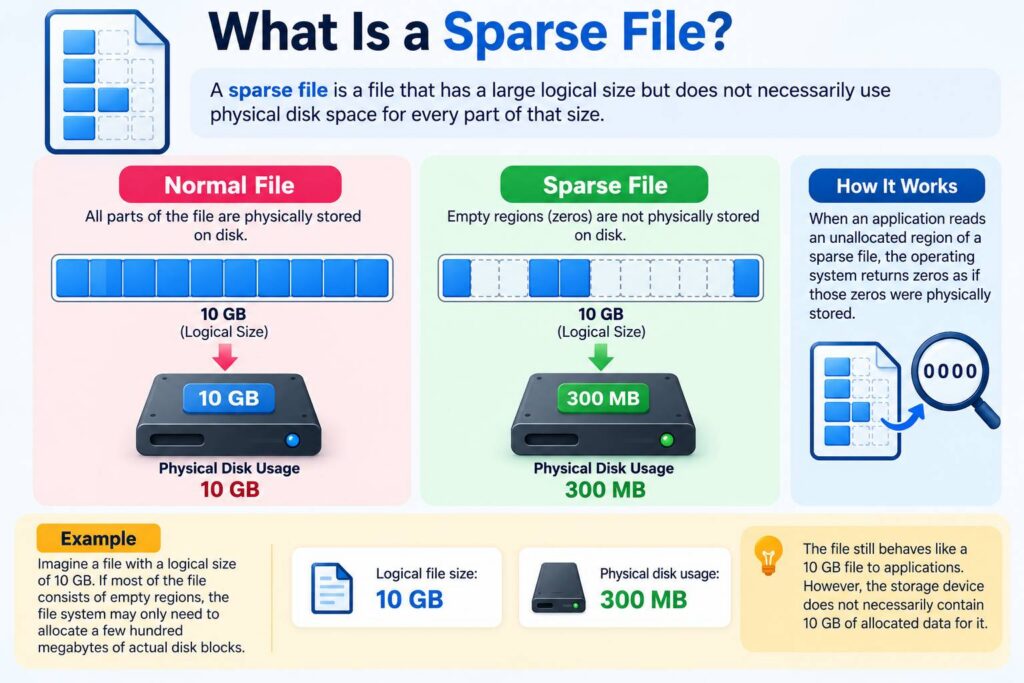
A sparse file is a file that has a large logical size but does not necessarily use physical disk space for every part of that size.
Instead of storing large areas containing only zeros or other unused regions, the file system can leave those areas unallocated. When an application reads an unallocated region of a sparse file, the operating system typically returns zeros as if those zeros were physically stored.
For example, imagine a file with a logical size of 10 GB. If most of the file consists of empty regions, the file system may only need to allocate a few hundred megabytes of actual disk blocks.
The result is:
- Logical file size: 10 GB
- Physical disk usage: 300 MB
The file still behaves like a 10 GB file to applications. However, the storage device does not necessarily contain 10 GB of allocated data for it.
This is the basic idea behind sparse files.
How Do Sparse Files Work?
To understand how sparse files work, it helps to think about the difference between a file’s logical address space and its physical storage blocks.
A normal file generally requires storage blocks for the data that it contains. A sparse file, however, can contain gaps called holes.
Suppose a file logically contains data like this:
Data | Empty | Empty | Empty | DataA traditional file may allocate storage for the entire range.
A sparse file can store only the portions containing actual data:
Allocated blocks | Hole | Allocated blocksThe hole does not need to occupy physical disk blocks.
When an application reads from the hole, the file system treats the unallocated region as containing zero bytes.
When data is later written into that region, the file system can allocate physical blocks for the newly written data.
This allows applications to work with very large files without immediately consuming an equivalent amount of storage.
A Simple Sparse File Example
Consider a disk image with a logical size of 100 GB.
If the image contains only 5 GB of actual information and the remaining space has never been written, the file system may store only the required 5 GB of physical blocks.
You could therefore see something similar to:
File size:       100 GB
Size on disk:      5 GB
The exact numbers depend on the file system, allocation unit, compression, metadata, and other factors.
The important point is that file size and physical storage consumption are not always the same thing.
Sparse File vs Normal File
The difference between a sparse file and a normal file becomes clearer when comparing how unused regions are stored.
| Feature | Sparse File | Normal File |
|---|---|---|
| Logical size | Can be very large | Usually corresponds more closely to stored data |
| Empty regions | Can remain unallocated | Normally occupy allocated blocks |
| Physical disk usage | Can be much smaller | Generally larger |
| Reading holes | Usually returns zeros | Reads stored data |
| Useful for | Disk images, databases, VMs | General file storage |
| Storage efficiency | High for files with large empty regions | Lower for large empty regions |
A normal file containing millions of zero bytes may require physical blocks for those zero bytes.
A sparse file can represent those same zero-filled regions without allocating every corresponding block.
However, sparse files are not automatically better for every situation. Their benefits depend on the type of data being stored and the file system supporting sparse allocation.
Why a File Size Can Be Misleading
One of the most confusing aspects of sparse files is that the number shown as the file’s size may not tell you how much physical storage the file consumes.
Operating systems commonly distinguish between logical size and allocated size.
Logical Size
The logical size represents how large the file appears to applications.
For example:
Logical size: 50 GBAn application may open the file and treat it as a 50 GB file.
Allocated Size
The allocated size represents the amount of physical storage currently assigned to the file.
For example:
Allocated size: 2 GBThe remaining space may consist of unallocated holes.
This explains why a file size can be misleading if you only look at its displayed size.
It does not necessarily mean the operating system is reporting an incorrect value. The two measurements describe different things.
Where Are Sparse Files Used?
Sparse files are particularly useful when applications need large logical files but much of the file contains unused space.
1. Virtual Machine Disk Images
Virtual machines often use virtual disk files.
A virtual disk may be configured as 100 GB even when the guest operating system initially uses only a small portion of that space.
A dynamically allocated virtual disk can therefore grow as data is written.
This can significantly reduce the initial storage requirement.
2. Database Files
Some database systems can use large files containing regions that are not immediately populated with meaningful data.
Sparse allocation can reduce storage requirements when large portions of a file remain unused.
The exact implementation depends on the database and underlying file system.
3. Disk Images
Disk images can contain large unused areas.
Instead of storing every unused sector, software can sometimes represent those areas as holes.
This makes sparse disk images particularly useful for backups, testing environments, and virtualized systems.
4. Backup Systems
Backup software may encounter large files containing unused regions.
If sparse-file support is available, backup and restore processes can preserve those holes instead of unnecessarily converting them into physically allocated zero-filled blocks.
5. Testing and Development
Developers sometimes create very large test files without wanting to consume the same amount of physical disk space.
Sparse files can be useful for testing applications that need to handle large file sizes.
Sparse Files and Zero-Filled Data
A common misunderstanding is that a sparse file contains no data in its holes.
Conceptually, the file contains zeros in those regions when they are read.
The difference is how those zeros are represented on storage.
Imagine a 1 GB file where the entire file is logically filled with zero bytes.
A regular representation might allocate approximately 1 GB of storage.
A sparse representation can potentially record that the file has a 1 GB logical range while allocating very little or even no data blocks for that range.
When the application reads the file, the file system supplies zero bytes for the hole.
This is an important distinction between logical file content and physical block allocation.
Do Sparse Files Always Save Disk Space?
No.
Sparse files save space when they contain large unallocated regions. If every part of the file contains actual data, there may be little or no opportunity for sparse storage.
For example, a 10 GB video file containing continuously stored compressed video data generally cannot become dramatically smaller simply because it is marked as sparse.
Sparse allocation is most useful when a file contains large unused or zero-filled regions.
Additionally, copying a sparse file incorrectly can cause its holes to become fully allocated. A copy operation that writes every zero byte as ordinary data can turn a small sparse file into a much larger physically allocated file.
Sparse Files and File Systems
Sparse-file behavior depends on the operating system and file system.
Common modern file systems can support sparse files, although implementation details vary.
For example, Windows systems commonly use NTFS, which supports sparse files. Linux systems can also use sparse files on file systems such as ext4 and XFS.
The commands and APIs used to create, inspect, copy, or preserve sparse files differ between operating systems.
This means that moving a sparse file between systems does not always guarantee that its sparse characteristics will be preserved.
How to Check Whether a File Is Sparse
There are several ways to investigate a file’s actual storage usage.
On Windows, file properties can sometimes show both the file size and the amount of disk space used. Specialized commands and system APIs can provide more detailed information about allocated ranges.
On Linux, commands such as du and ls -l can provide different views of file size and disk usage.
For example:
ls -lh file.img
du -h file.img
These commands can show why a file’s apparent size and storage consumption may differ.
When investigating unusual disk usage, it is therefore useful to compare both values rather than relying on a single file-size measurement.
Sparse Files vs File Compression
Sparse files and compression are sometimes confused because both can reduce physical storage usage, but they work differently.
Sparse allocation avoids storing unallocated regions.
Compression stores data in a smaller encoded representation.
For example, a large region of zeros can be represented efficiently by a sparse hole. Other repetitive data may benefit from compression.
Some storage systems can use both techniques, although the exact behavior depends on the operating system and file system.
Can Sparse Files Become Large Suddenly?
Yes.
A sparse file can consume significantly more physical storage when applications write data into previously unallocated regions.
For example, a 100 GB sparse file might initially occupy only 1 GB.
If an application gradually writes data across the remaining unused regions, the physical disk usage can increase.
Eventually, the file could consume close to its full logical size.
This is important when managing virtual disks and large database files because free disk space can disappear as sparse files expand.
Why Sparse Files Matter for Storage Management
Sparse files demonstrate an important principle in computer storage: the size of a file and the amount of storage allocated to that file are not necessarily identical.
This distinction is useful when:
- Investigating unexpected disk usage
- Managing virtual machines
- Working with disk images
- Creating large test files
- Designing backup systems
- Understanding binary data
- Troubleshooting storage capacity
- Comparing file sizes across file systems
It also explains why two files with the same displayed size can consume very different amounts of physical storage.
Final Thoughts
A sparse file is a file whose logical size can be much larger than its physical storage allocation. Instead of allocating disk blocks for unused regions, the file system can represent those regions as holes.
Understanding how sparse files work makes it easier to understand virtual disk images, large database files, backup systems, and unusual differences between displayed file size and disk usage.
The key distinction is simple:
Logical size tells you how large the file is. Physical allocation tells you how much storage is currently being used.
That is why a file that appears to be 100 GB may occupy only a fraction of that space—and why its physical storage usage can increase as previously empty regions are written with real data.
Also Read:
- Before You Close Incognito Mode: What You Should Know About Chrome DNS Cache
- How Netflix Delivers Video: What Happens When You Press Play?
- How to Find Large Files Taking Up Disk Space in Windows
- What Is Digital Forensics? How Investigators Trace and Reconstruct a Cyberattack
- Agentic AI Under Attack: How Hackers Can Exploit AI Agents
- What Is a MAC Address?
- How Firewalls Stop Cyberattacks
- Virus vs Worm vs Trojan vs Ransomware: What Is the Difference?
- Why Does My PC Take So Long to Boot? 10 Common Causes and Fixes