

Have you ever searched for a file corrupter and wondered what it actually does? Is it simply a tool that breaks files, or does it serve a practical purpose? While the name may sound destructive, a file corrupter is often used in software testing, cybersecurity training, digital forensics, and other legitimate scenarios where creating an intentionally unreadable file is useful.
A file corrupter modifies the internal structure of a file so that applications can no longer process it correctly. The file may still have the same name and extension, but when someone tries to open it, the program displays an error because important parts of the file have been altered.
People use file corrupters for many different reasons. A software developer might need to test whether an application correctly detects damaged uploads. A cybersecurity instructor may use corrupted files to teach students how malware or storage failures affect documents. A digital forensics student may intentionally corrupt a file to practice recovery techniques in a controlled environment.
At the same time, file corrupters are often discussed online for less appropriate reasons. Some students think about corrupting an assignment to gain extra time before submission, while some employees consider sending a damaged document when a report is not yet complete. Although these situations are commonly mentioned on forums and social media, using a corrupted file to mislead someone can have academic or professional consequences if discovered. Honest communication is always the better choice.
In this guide, you’ll learn exactly what a file corrupter is, how it works, where it is legitimately used, its advantages and limitations, and why understanding file corruption is valuable whether you’re a developer, IT professional, student, or everyday computer user.
What Is a File Corrupter?
Definition
“A file corrupter is a software tool that intentionally modifies a file so it becomes unreadable or partially unreadable by the application designed to open it. Instead of deleting the file, the tool changes its internal data structure, causing the program to report that the file is damaged, invalid, or corrupted.“
Definition By Topan
For example, suppose you have a Microsoft Word document named Project_Report.docx. After processing it through a file corrupter, the file will still appear in your folder with the same name and extension. However, when Microsoft Word attempts to open it, you might receive an error stating that the document cannot be opened because its contents are corrupted or unreadable.
The same concept applies to many other file formats, including:
- PDF documents
- Microsoft Word files
- Excel spreadsheets
- PowerPoint presentations
- ZIP archives
- Images (JPG, PNG)
- Videos (MP4)
- Audio files
- CSV and text files
Unlike accidental corruption caused by hardware failures or interrupted downloads, a file corrupter creates this condition deliberately. The goal is not necessarily to destroy data permanently but to produce a file that behaves as though it has become damaged.
File Corrupter vs. Corrupted File
Many people confuse these two terms, but they refer to different things.
| File Corrupter | Corrupted File |
|---|---|
| A tool used to intentionally damage a file’s structure. | The damaged file itself. |
| Used for testing, education, research, or demonstrations. | May result from intentional modification or accidental damage. |
| Creates corruption. | Is the result of corruption. |
Think of it this way: a file corrupter is the tool, while a corrupted file is the output.
For instance, if a quality assurance engineer wants to verify that an online document upload system rejects damaged files, they can use a file corrupter to create a sample corrupted PDF. The upload system should then detect the problem and display an appropriate error message instead of accepting the invalid document.
Also Read: Corrupted File vs Damaged Storage: What’s the Difference?
Understanding this distinction helps explain why file corrupters have legitimate applications despite their name. In many industries, they are valuable testing utilities rather than tools intended to cause harm.
How Does a File Corrupter Work?
At first glance, a file looks like a single document stored on your computer. In reality, every file is made up of carefully organized binary data that follows a specific format. Whether it’s a PDF, Word document, Excel spreadsheet, image, or video, each file contains a structure that tells software how to read and display its contents.
A file corrupter intentionally disrupts this structure. Instead of deleting the file, it modifies important parts of the data so that the application can no longer interpret the information correctly.
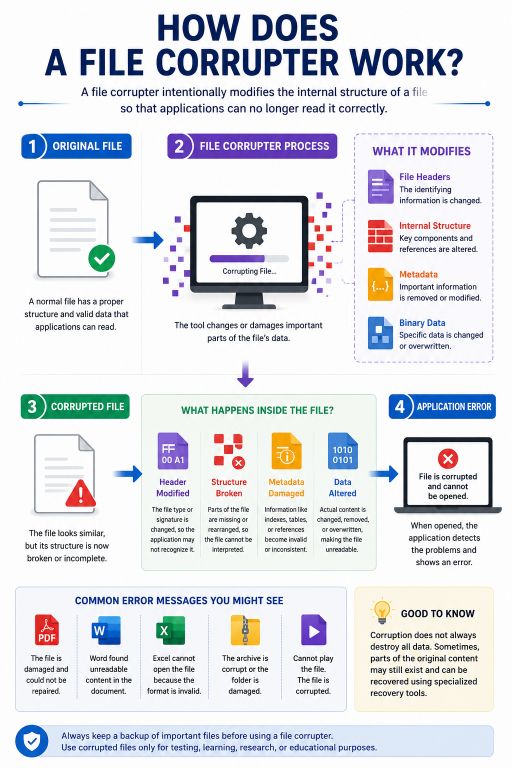
Think of a file as a book. The pages still exist, but if someone removes the table of contents, tears out a few important pages, and rearranges several chapters, reading the book becomes difficult or even impossible. A file corrupter works in a similar way by altering the “instructions” that software relies on to open a file.
File Headers
Most file formats begin with a file header, which acts like an identification card. The header tells the operating system and applications what type of file they are dealing with.
For example, a PDF file contains information that identifies it as a PDF document, while a JPEG image has a completely different signature.
If these identifying bytes are modified, the application may no longer recognize the file format and display an error instead.
Internal File Structure
Modern file formats are highly organized.
A Microsoft Word document contains multiple XML files packaged together inside a ZIP archive. A PDF contains objects, fonts, images, references, and metadata. A video file stores audio and video streams in separate sections that work together during playback.
A file corrupter may intentionally alter these internal components by:
- Changing important binary values
- Removing essential metadata
- Breaking internal references
- Damaging compression information
- Modifying file indexes
- Corrupting structural markers
Once these elements are changed, the application struggles to interpret the data correctly.
Metadata Corruption
Metadata describes important information about a file without being the actual content.
Examples include:
- Creation date
- File version
- Object references
- Encoding information
- Page indexes
- Compression settings
If metadata becomes inconsistent or incomplete, many applications refuse to open the file because they cannot determine how the remaining data should be processed.
Why Software Refuses to Open Corrupted Files
Applications are designed to protect users from damaged or incomplete data. When they detect inconsistencies, they often stop processing instead of guessing what the file should contain.
As a result, users may see messages such as:
- “The file is corrupted and cannot be opened.”
- “Invalid file format.”
- “The document cannot be repaired.”
- “Unexpected end of file.”
- “Archive is invalid.”
- “File appears to be damaged.”
These messages are not random—they indicate that the application’s validation checks have failed.
Use Our Tools – Intentionally Corrupt Files
Corrupt PDF File Online Create damaged PDF files for testing and recovery purposes.
Corrupt Word File Online Intentionally corrupt DOC and DOCX files for software testing.
PDF Corruption Tool Generate corrupted PDF documents directly in your browser.
Does a File Corrupter Delete Your Data?
Not necessarily.
In most cases, a file corrupter only changes enough information to prevent normal access. Some parts of the original data may still exist inside the file.
This is one reason why data recovery specialists are sometimes able to recover portions of intentionally or accidentally corrupted files using specialized recovery software.
However, recovery is never guaranteed. The more extensive the corruption, the lower the chances of restoring the original content.
Why Would Someone Intentionally Corrupt a File?
The idea of deliberately damaging a file may seem unusual, but there are situations where creating a corrupted file serves a legitimate purpose. Software developers, cybersecurity professionals, quality assurance engineers, and researchers often need damaged files to test how applications respond to unexpected conditions.
Unfortunately, the internet has also popularized questionable uses for file corrupters. Some people search for these tools hoping to delay deadlines or avoid sharing unfinished work. While these scenarios are commonly discussed online, they can damage trust and have serious academic or professional consequences if used deceptively.
Let’s look at some real-world examples.
Example 1: Testing File Upload Validation
Imagine you’re developing a website where users can upload PDF documents.
You want to ensure that your application doesn’t simply accept every uploaded file. Instead, it should detect damaged documents and display an appropriate error message.
Rather than waiting for a naturally corrupted file, you intentionally create one using a file corrupter.
After uploading it, you verify that the system correctly rejects the file and informs the user about the problem.
This is one of the most common and legitimate uses of a file corrupter in software development.
Example 2: Learning Digital Forensics
A university student studying digital forensics wants to understand how corrupted storage devices affect files.
The instructor provides several intentionally corrupted ZIP archives and Word documents. Students attempt to analyze the damaged files using forensic software and determine whether any information can be recovered.
This hands-on practice prepares them for real investigations where damaged files may contain valuable evidence.
Example 3: Cybersecurity Awareness Training
An organization’s cybersecurity team is conducting employee awareness training.
During the session, employees receive several sample files.
Some open normally, while others have been intentionally corrupted.
The exercise teaches staff how applications react to damaged files, why unexpected errors should not be ignored, and how file corruption sometimes indicates hardware failure, malware, or interrupted downloads.
Using a file corrupter in a controlled environment helps employees recognize these situations without putting real business data at risk.
Example 4: “I Wasn’t Ready to Share My Work Yet”
Rahul had spent nearly two weeks preparing a detailed PowerPoint presentation for an important client meeting.
Although the presentation was almost complete, he wanted one more day to refine the graphics, verify the data, and practice his delivery. A colleague repeatedly asked him to send the presentation before it was finalized.
Instead of sharing unfinished work, Rahul considered sending a corrupted copy temporarily and promising to resend the “fixed version” later.
While situations like this are often discussed online, intentionally misleading colleagues can damage workplace relationships if the truth comes to light. A better approach would be to explain that the presentation is still being reviewed and will be shared once it is ready.
Being transparent may feel uncomfortable in the moment, but it helps build long-term trust.
Example 5: “My Boss Asked for the Monthly Report”
Priya was responsible for preparing her company’s monthly sales report.
On Monday morning, her manager unexpectedly requested the report several hours before the agreed deadline. Unfortunately, important sales figures from one regional office had not yet been received.
A friend jokingly suggested sending a corrupted Excel file to buy more time.
Although this idea appears in countless online discussions, using a damaged file as an excuse can quickly backfire. If the manager asks for another copy immediately—or discovers the deception—it can affect credibility far more than simply admitting the report needs a little more time.
Most managers appreciate honest communication much more than excuses.
Example 6: The Student Assignment Excuse
Perhaps the most well-known use of file corrupters involves school and college assignments.
A student realizes the assignment deadline is only minutes away, but the work is still incomplete. After searching online, they find websites claiming to generate corrupted documents for submission.
The hope is that the teacher will be unable to open the file and grant extra time for resubmission.
While this tactic has become an internet meme, many educational institutions are now familiar with it. Some learning management systems automatically validate uploaded documents, and instructors may request that students resend the file immediately.
Attempting to gain extra time through deception can lead to penalties or disciplinary action. Completing the assignment honestly or requesting an extension is usually the safer and more ethical choice.
Legitimate Uses of a File Corrupter
Although the term “file corrupter“ often carries a negative impression, the tool itself has many practical and legitimate applications. Professionals across different industries intentionally create corrupted files to test systems, improve software reliability, conduct research, and train users to handle unexpected situations.
When used responsibly, a file corrupter becomes a valuable testing utility rather than a tool for deception.
Software Development
Software developers frequently build applications that allow users to upload documents, images, videos, or other files. Before releasing these applications, developers need to verify that invalid or damaged files are handled safely.
Instead of waiting for naturally corrupted files to appear, developers intentionally generate them. They then upload these files to ensure the application:
- Rejects invalid files gracefully
- Displays meaningful error messages
- Prevents application crashes
- Protects servers from malformed file attacks
- Logs errors correctly for debugging
Without testing against corrupted files, an application may behave unpredictably when users accidentally upload damaged documents.
Quality Assurance (QA) Testing
Quality assurance engineers are responsible for identifying bugs before software reaches customers.
A file corrupter helps QA teams create hundreds of different test cases without relying on random hardware failures or damaged downloads.
For example, a cloud storage platform may need to verify that it correctly handles:
- Corrupted PDF uploads
- Damaged ZIP archives
- Invalid image files
- Broken video files
- Incomplete Office documents
Each test helps developers improve the software’s stability and user experience.
Cybersecurity Research
Cybersecurity professionals regularly analyze damaged files to understand how software responds to unexpected or malicious inputs.
Although a corrupted file is not necessarily malware, attackers sometimes exploit malformed files to trigger vulnerabilities in poorly written software.
Security researchers intentionally generate corrupted files to evaluate whether applications:
- Crash unexpectedly
- Reveal sensitive information
- Become unstable
- Execute unsafe code
- Handle invalid input securely
These tests contribute to stronger and more secure software.
Digital Forensics
Digital forensic investigators often encounter damaged storage devices, partially recovered documents, or corrupted archives during investigations.
Learning how corruption affects file structures helps investigators determine:
- Whether data can still be recovered
- Which parts of the file remain intact
- How corruption occurred
- Whether corruption was accidental or intentional
Training with artificially corrupted files allows investigators to practice recovery techniques before working on real evidence.
Backup and Recovery Testing
Many organizations invest heavily in backup systems but rarely verify whether those backups actually work.
IT administrators sometimes corrupt copies of files intentionally and then test whether their backup solution can successfully restore the original data.
This process confirms that disaster recovery plans will work when real data loss occurs.
Educational Purposes
Schools, universities, and training institutes often use corrupted files as learning materials.
Students studying:
- Computer science
- Information technology
- Cybersecurity
- Digital forensics
- Data recovery
can better understand file systems by examining damaged documents in controlled environments.
Learning through practical examples is often far more effective than reading theory alone.
Common Use Cases at a Glance
| Use Case | Purpose |
|---|---|
| Software Development | Test upload validation and error handling |
| Quality Assurance | Verify application stability |
| Cybersecurity Research | Analyze how software handles malformed files |
| Digital Forensics | Practice file recovery techniques |
| Backup Testing | Verify disaster recovery procedures |
| Education | Teach file structures and recovery concepts |
| IT Training | Demonstrate real-world file corruption scenarios |
Is Using a File Corrupter Legal?
In most countries, using a file corrupter itself is legal. Like many software utilities, its legality depends on how and why it is used, not simply on the existence of the tool.
For example, intentionally corrupting your own copy of a document for software testing, quality assurance, cybersecurity training, or educational purposes is generally considered a legitimate use.
Common lawful uses include:
- Testing file upload systems
- Developing software
- Conducting cybersecurity research
- Practicing digital forensics
- Testing backup and recovery procedures
- Demonstrating file corruption during training
However, problems can arise if someone uses a corrupted file to intentionally deceive another person.
Examples include:
- Pretending completed work was submitted when it was not
- Attempting to gain extra time by sending a corrupted assignment
- Misleading clients or employers about project status
- Creating confusion during business transactions
In these situations, the issue is not the software itself but the dishonest intent behind its use.
A file corrupter should be viewed much like other technical utilities. It can be used responsibly for testing and learning, or it can be misused. Choosing ethical and transparent practices is always the better approach.
Risks of Using a File Corrupter
Before intentionally corrupting any file, it’s important to understand the possible consequences.
Permanent Data Loss
If you accidentally corrupt the only copy of an important document, recovering it may be difficult—or impossible.
Always assume that corruption could permanently damage the file.
Overwriting the Original File
Some tools replace the original file instead of creating a separate corrupted copy.
If no backup exists, your original work could be lost.
Recovery Is Not Guaranteed
Although recovery software sometimes repairs damaged files, success depends on:
- File type
- Extent of corruption
- Storage condition
- Available backups
There is never a guarantee that lost data can be restored.
Professional Reputation
Using corrupted files as an excuse in the workplace or classroom may provide a short delay, but if the deception is discovered, the long-term impact on your reputation can be far greater than the temporary benefit.
Trust is difficult to rebuild once lost.
Wasted Time
Attempting to recover a damaged file often takes much longer than simply creating backups or communicating honestly about delays.
A few minutes spent making a backup can save hours of recovery work later.
Best Practices Before Corrupting Any File
Whether you’re using a file corrupter for software testing, research, or educational purposes, following a few simple precautions can help you avoid unnecessary data loss and frustration.
Always Keep a Backup
The first rule is simple: never work on the only copy of an important file.
Before using a file corrupter, create a duplicate of the original document and store it in a safe location. This ensures you can return to the original version if something goes wrong.
Many experienced developers and IT professionals follow the “copy first, test second” approach. It reduces risk and prevents accidental loss of valuable work.
Corrupt a Copy, Not the Original
A file corrupter should always be used on a duplicate file.
For example, instead of corrupting:
Project_Report.docx
Create a copy named:
Project_Report_Test.docx
Then use the copied file for testing. This simple habit protects your original work and makes testing much safer.
Verify the Corrupted File
After generating a corrupted file, try opening it in the intended application.
For example:
- Open a corrupted PDF in a PDF reader.
- Open a corrupted Word document in Microsoft Word.
- Try extracting a corrupted ZIP archive.
- Play a corrupted video in a media player.
This helps confirm that the corruption behaves as expected and produces the desired error message.
Also Read: Smart Home Surveillance: 7 Shocking Privacy Risks You Must See
Use Corrupted Files Only in Safe Environments
If you’re testing software, perform the tests in a development or staging environment whenever possible.
Avoid using intentionally corrupted files on production systems unless the testing process has been planned and approved.
Understand the Purpose
Ask yourself why you’re creating the corrupted file.
If the answer is software testing, cybersecurity research, backup verification, or education, a file corrupter can be a valuable utility.
If the goal is simply to avoid a deadline or mislead someone, it’s worth reconsidering. Open communication is usually a better solution than creating unnecessary complications.
How to Use FileCorrupter.org
Creating a corrupted file doesn’t require installing complex software. With FileCorrupter.org, the process is straightforward and designed to be accessible even for users with little technical experience.
Here’s how it works:
Step 1: Open the Tool
Visit FileCorrupter.org in your web browser.
Step 2: Upload a Copy of Your File
Choose the file you want to use for testing.
To protect your data, upload a duplicate rather than the original document.
Step 3: Corrupt the File
Click the appropriate button to generate the corrupted version.
The tool modifies the file so that it becomes unreadable while keeping the original copy unchanged on your computer.
Step 4: Download the Corrupted Version
Save the newly generated file to your preferred location.
You can now use it for software testing, quality assurance, cybersecurity demonstrations, or educational purposes.
Step 5: Verify the Result
Try opening the corrupted file in the appropriate application to confirm that it behaves as expected.
If your goal is testing upload validation or error handling, you can now upload the corrupted file to your application and observe how the system responds.
Frequently Asked Questions
What is a file corrupter?
A file corrupter is a tool that intentionally modifies a file’s internal structure, making it unreadable or partially unreadable by the software designed to open it. It is commonly used for software testing, cybersecurity research, quality assurance, and educational purposes.
Is a file corrupter legal?
Yes. Using a file corrupter is generally legal when used for legitimate purposes such as testing, research, training, or learning. However, using corrupted files to intentionally deceive employers, teachers, clients, or others may lead to academic, professional, or contractual consequences.
Can a corrupted file be repaired?
Sometimes. The possibility of recovery depends on the file type, the extent of the damage, and whether backup copies are available. Minor corruption may be repairable, while severe corruption can result in permanent data loss.
Which file types can be corrupted?
Most digital file formats can be corrupted, including PDF, DOCX, XLSX, PPTX, ZIP, JPG, PNG, MP4, MP3, CSV, and many others.
Will a file corrupter delete my original file?
Not if you use it correctly. It’s always recommended to create a copy of your file before corruption so your original remains safe.
Why do software developers use corrupted files?
Developers use corrupted files to ensure their applications correctly detect invalid uploads, display useful error messages, and remain stable when handling damaged input.
Can corrupted files contain malware?
Not necessarily. A corrupted file is simply a damaged or intentionally modified file. While malware can corrupt files, a corrupted file itself is not automatically malicious.
Can antivirus software detect corrupted files?
Antivirus programs primarily detect malicious software, not ordinary file corruption. A damaged file may trigger an application error without being flagged as malware.
Why won’t my corrupted file open?
Applications rely on specific file structures to interpret data. If essential parts of the file have been modified or removed, the software cannot process the contents and displays an error.
Should I corrupt important files?
No. Always create a duplicate before using a file corrupter. Corrupting the only copy of an important document can result in permanent data loss.
A file corrupter is more than just a tool that makes files unreadable. When used responsibly, it plays an important role in software development, quality assurance, cybersecurity research, digital forensics, and technical education. By intentionally creating damaged files, developers and IT professionals can verify how applications respond to unexpected situations, strengthen error handling, and improve overall software reliability.
Like many technical tools, a file corrupter is defined by the way it is used. Creating corrupted files for testing, training, or learning is a legitimate practice adopted by organizations around the world. On the other hand, using intentionally damaged files to mislead employers, educators, or clients can harm trust and lead to unnecessary consequences.
If you need to create a corrupted file for testing, research, software validation, or educational purposes, use a copy of your original file, keep reliable backups, and verify the results before using the file in your workflow. Following these simple practices helps protect your data while allowing you to safely explore how applications handle damaged files.
Whether you’re a developer testing upload validation, a cybersecurity professional analyzing file behavior, a student learning about file systems, or simply curious about how file corruption works, understanding the purpose and responsible use of a file corrupter will help you make informed decisions and avoid common mistakes.