
Most people worry about hackers.
Others worry about ransomware, malware, phishing scams, and data breaches.
Very few people worry about their files quietly decaying while sitting untouched on a storage device.
That is exactly what makes bit rot file corruption so dangerous.
There are no warning messages. No flashing alerts. No suspicious emails. No attackers demanding payment. The damage occurs silently, often over the course of years, until one day an important file refuses to open, a photograph appears distorted, or a critical archive becomes unreadable.
The assumption that digital files last forever is one of the biggest myths in technology.
Digital information is not immortal.
It ages.
It degrades.
And sometimes it disappears.
Bit rot file corruption is the silent threat that proves even perfectly stored files are not always safe.
What Is Bit Rot File Corruption?
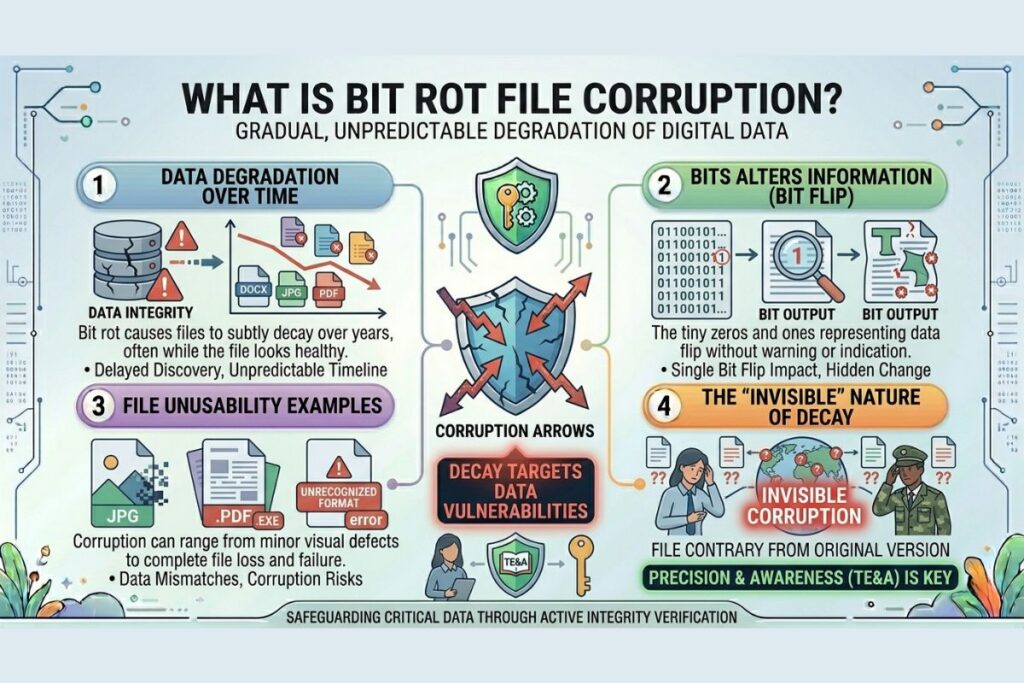
Bit rot file corruption refers to the gradual and often undetectable degradation of digital data over time.
Every digital file is made up of bits. Those bits exist as zeros and ones that represent information. When those bits change unexpectedly, even by a tiny amount, the file may become corrupted.
Sometimes the corruption is minor.
Other times a single altered bit can render an entire file unusable.
The frightening part is that the corruption often happens without any visible indication that something is wrong.
A file can appear perfectly healthy for years.
Then one day it fails.
That delayed discovery is what makes bit rot so difficult to manage.
Use Our: File Corrupter – Corrupt Any File Online in Seconds
Why People Assume Their Files Are Safe
Digital technology has conditioned us to believe information lasts forever.
We save documents to hard drives.
We upload files to cloud services.
We create backups.
We move data between devices.
After doing all of this, it feels reasonable to assume the information is secure indefinitely.
Unfortunately, storage is not the same as preservation.
A file sitting on a drive for ten years is not necessarily in the same condition as the day it was saved.
Storage devices age.
Components wear out.
Environmental conditions take their toll.
Data integrity can slowly erode without attracting attention.
The result is a dangerous sense of confidence that may not reflect reality.
Also Read: Text Diff: The Most Overlooked Code Review Tool
How Bit Rot Happens
There is no single cause of bit rot file corruption.
Instead, several factors contribute to the gradual deterioration of digital information.
Storage media naturally degrade over time. Magnetic storage loses strength. Electronic components become less reliable. Flash memory cells experience wear and eventually lose their ability to retain information accurately.
Environmental conditions also matter.
Excessive heat, humidity, vibration, electrical instability, and physical damage can all contribute to corruption.
Even cosmic radiation plays a role.
High energy particles from space occasionally interact with electronic components and alter stored bits. While uncommon, these events are real and well documented.
When these factors accumulate over time, files become increasingly vulnerable to corruption.
Why Silent Corruption Is So Dangerous
Most technology failures are obvious.
A hard drive crashes.
A system displays an error.
A ransomware infection locks files.
Bit rot behaves differently.
The corruption often remains hidden.
A damaged file may continue to sit quietly inside an archive without triggering any warnings.
Everything appears normal.
The file exists.
The folder is present.
The backup seems complete.
Then the file is opened.
Only then does the problem reveal itself.
This delayed discovery often leaves users with few recovery options.
By the time corruption is detected, healthy copies may no longer exist.
Why Archives Face the Greatest Risk
Archives are uniquely vulnerable because they are designed for long term storage.
A family photo collection might remain untouched for years.
Historical records may sit in storage for decades.
Businesses retain documents to satisfy regulatory requirements.
Researchers preserve information for future study.
The longer information remains stored, the more opportunities bit rot has to occur.
Ironically, the files people value most are often the files least likely to be accessed regularly.
This creates the perfect environment for silent corruption.
A file can slowly degrade while everyone assumes it remains intact.
Real World Consequences
The impact of bit rot file corruption extends far beyond inconvenience.
Imagine losing a decade of family photographs.
Consider a law firm discovering that archived records are unreadable.
Think about a software company learning that historical source code has become corrupted.
Museums, governments, healthcare providers, and educational institutions all face similar risks.
Digital information increasingly serves as the foundation of modern society.
When that information becomes unreliable, the consequences can be severe.
Data loss is not merely a technical problem.
It is often a business problem, a legal problem, and sometimes even a historical problem.
Why Backups Are Not Enough
Many people believe backups solve everything.
Backups are essential.
They are not perfect.
A corrupted file can be copied into a backup system.
Once that happens, the corruption exists in multiple locations.
If the corruption goes unnoticed long enough, older healthy versions may be overwritten.
Now every copy contains the same damage.
This is why modern data protection strategies focus not only on duplication but also on verification.
Having multiple copies is valuable.
Knowing those copies are accurate is even more important.
How Organizations Fight Bit Rot File Corruption
Organizations responsible for valuable information use several techniques to protect against silent corruption.
One of the most effective methods involves checksums.
A checksum functions like a digital fingerprint. When a file is created, a unique value is generated based on its contents. Future checks can determine whether the file remains unchanged.
If the checksum changes unexpectedly, corruption has occurred.
Many organizations also use redundancy.
Multiple copies of information are stored across different devices and locations.
Some advanced storage systems automatically verify data integrity and repair corruption when healthy copies are available.
Routine testing plays a major role as well.
The best preservation strategies assume corruption will eventually occur and focus on detecting it before it becomes catastrophic.
How Individuals Can Protect Their Files
Protecting personal archives does not require enterprise level infrastructure.
Several practical steps can significantly reduce risk.
Maintain multiple backups.
Store copies on different devices.
Use reputable cloud storage providers as part of a broader backup strategy.
Regularly open important files to verify they remain accessible.
Replace aging storage devices before they fail.
Organize archives so critical information is easy to audit and verify.
Most importantly, do not assume a file is healthy simply because it exists.
Verification is the only reliable way to confirm integrity.
The Cybersecurity Connection
At first glance, bit rot may not seem like a cybersecurity issue.
In reality, it directly relates to one of the most important principles of security.
Integrity.
Cybersecurity is not solely about preventing unauthorized access.
It is also about ensuring information remains accurate, trustworthy, and complete.
When data becomes corrupted, integrity is compromised.
Organizations depend on accurate information for decision making, compliance, investigations, and operations.
Bit rot threatens that trust.
Understanding and addressing silent corruption strengthens an organization’s overall security posture.
Why This Matters More Than Ever
Humanity is generating more digital information than ever before.
Photos.
Videos.
Financial records.
Research data.
Medical information.
Software code.
Every year the volume grows.
As our dependence on digital information increases, preserving that information becomes increasingly important.
Future generations may inherit vast digital archives.
Whether those archives remain usable depends on how seriously we take preservation today.
Bit rot reminds us that technology is not immune to time.
Digital files require maintenance just as physical assets require care.
Ignoring that reality can have lasting consequences.
For more cybersecurity insights and digital preservation discussions, visit filecorrupter.org.
Additional resources:
https://www.digitalpreservation.gov
Frequently Asked Questions
What is bit rot file corruption?
Bit rot file corruption is the gradual degradation of digital information over time due to changing bits, storage media aging, environmental factors, and other causes.
Can SSDs experience bit rot?
Yes. Solid state drives can experience data retention issues and degradation over time, particularly when data remains unaccessed for extended periods.
Does cloud storage eliminate bit rot?
No. Cloud providers implement protections against corruption, but no storage solution is completely immune to integrity challenges.
How can I detect silent file corruption?
Regular file verification, checksum validation, backup testing, and integrity monitoring help identify corruption before significant data loss occurs.
Final Thought
The greatest threat to your archive may not be a cybercriminal.
It may not be ransomware.
It may not even be hardware failure.
It may simply be time.
Bit rot file corruption is a reminder that digital preservation requires effort. Information does not remain safe merely because it has been saved. It remains safe because someone actively protects it.
The files you value most deserve more than storage.
They deserve preservation.
Some of your most important files may already be corrupted. The only reason you do not know it yet is because you have not opened them
Explore More Free Tools
Hash Generator Tool
Generate secure MD5, SHA1, SHA256, and other cryptographic hashes instantly online.
Open Tool →Dummy File Generator
Create sample dummy files of custom sizes for testing uploads, storage, and applications.
Open Tool →Password Strength Checker
Analyze password security and identify weak passwords before using them online.
Open Tool →File Hash Checker
Verify file integrity by checking MD5, SHA256, and other file hash signatures.
Open Tool →UUID Generator
Generate random UUIDs and unique identifiers instantly for apps, APIs, and databases.
Open Tool →Text Diff Checker
Compare two text blocks side by side and quickly detect additions, deletions, and edits.
Open Tool →