

Most people think a power outage is just an inconvenience.
The lights flicker. The computers shut down. You wait a few minutes and everything powers back on.
You think your files are safe.
They may not be.
Power outages are one of the most underestimated causes of file corruption power outage. Even a brief interruption can leave documents, spreadsheets, databases, and backups silently damaged. The corruption may not appear immediately, but the next time you try to open a critical file, it might refuse to work—or worse, provide incorrect information without any warning.
Why Files Are Vulnerable During Power Loss
When electricity disappears, so does the stability that your storage devices rely on.
Hard drives may stop mid-write, leaving files partially saved.
Solid state drives may lose volatile cache data.
Open applications may write incomplete data to files.
Networked storage can fail mid-transfer, producing incomplete backups.
Even small surges during restoration of power can trigger subtle corruption.
A file that once worked perfectly may now contain missing bytes, broken pointers, or unreadable metadata—all without generating an error message.
How File Corruption Power Outage Occurs
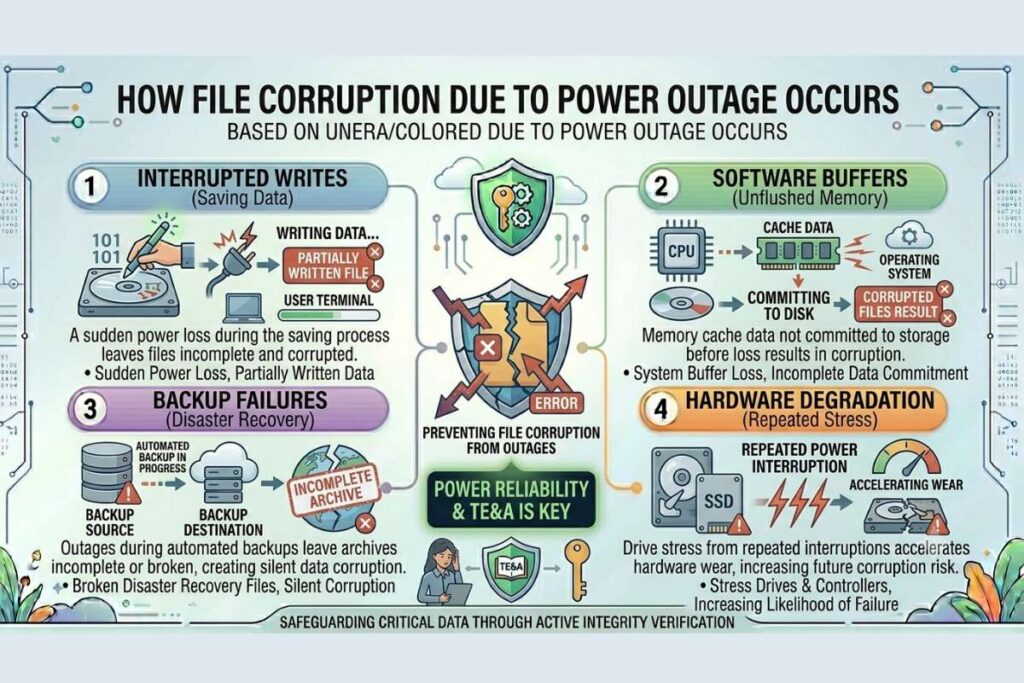
Interrupted Writes
Every time you save a file, data is written to your storage device. A sudden power loss during that process can leave the file partially written.
Software Buffers
Operating systems and applications often cache data in memory before committing it to disk. If the system loses power before the buffer is flushed, corrupted files result.
Backup Failures
Power outages during automated backups can leave archives incomplete or broken, creating silent data corruption in files that you rely on for disaster recovery.
Hardware Degradation
Repeated power interruptions can stress drives and controllers, accelerating wear and increasing the likelihood of corruption over time.
Real-World Consequences
The impact can range from minor inconvenience to catastrophic loss:
- A partially saved report could lead to incorrect financial analysis.
- Corrupted database files could compromise business operations.
- Critical backups may fail when needed most.
- Research datasets may become unusable.
- Family photographs or personal files may become permanently damaged.
Many people don’t realize the risk until it is too late.
Also Read: Corrupt ZIP Files: The Silent Threat Lurking in Your Archives
How to Protect Your Files
Protection starts before the outage:
- Use Uninterruptible Power Supplies (UPS):
UPS devices provide temporary backup power to safely shut down computers during outages. - Save Frequently:
Encourage regular saves, and avoid long sessions without saving open files. - Enable Auto-Save Features:
Many applications can automatically save versions in short intervals. - Test Your Backups:
Ensure that backups are complete, restorable, and verified regularly. - Checksum Verification:
Use checksums or file integrity tools to confirm that files have not been corrupted after a power event. - Redundant Storage:
Maintain copies on multiple devices or cloud storage to reduce the risk of data loss.
Why This Matters
Every power outage is a silent test for your data integrity. A single unexpected failure can compromise critical files, especially when files are left open or backups are incomplete.
Understanding file corruption power outage helps organizations and individuals prepare for these events, preserving both operational functionality and valuable information.
For additional guidance and cybersecurity insights, visit filecorrupter.org.
Other reputable references:
Frequently Asked Questions
Can a brief power outage corrupt files?
Yes. Even short interruptions can leave files partially written or caches incomplete, producing silent corruption.
Are SSDs immune to power outage corruption?
No. SSDs can be affected by interrupted writes, volatile memory cache loss, and firmware issues, though they are less mechanically vulnerable than HDDs.
How can I detect corruption after a power outage?
File verification tools, checksums, and restoring backup copies are effective methods to detect whether files were damaged during a power outage.
Does cloud storage prevent power outage corruption?
Cloud storage can reduce risk, but local power interruptions can corrupt files before they are uploaded. Verification is still recommended.
Final Thought
Power outages are unpredictable, but the damage they cause to your files doesn’t have to be.
Understanding file corruption power outage and taking proactive steps—backup validation, checksum verification, and UPS use—ensures that a simple flicker of the lights doesn’t turn into permanent data loss.
The file you trust most could already be corrupted after the last outage. The only way to know for sure is to check it.
Explore More Free Tools
Hash Generator Tool
Generate secure MD5, SHA1, SHA256, and other cryptographic hashes instantly online.
Open Tool →Dummy File Generator
Create sample dummy files of custom sizes for testing uploads, storage, and applications.
Open Tool →Password Strength Checker
Analyze password security and identify weak passwords before using them online.
Open Tool →File Hash Checker
Verify file integrity by checking MD5, SHA256, and other file hash signatures.
Open Tool →UUID Generator
Generate random UUIDs and unique identifiers instantly for apps, APIs, and databases.
Open Tool →Text Diff Checker
Compare two text blocks side by side and quickly detect additions, deletions, and edits.
Open Tool →