
Most people panic when they see a corrupted file.
Cybersecurity professionals see opportunity.
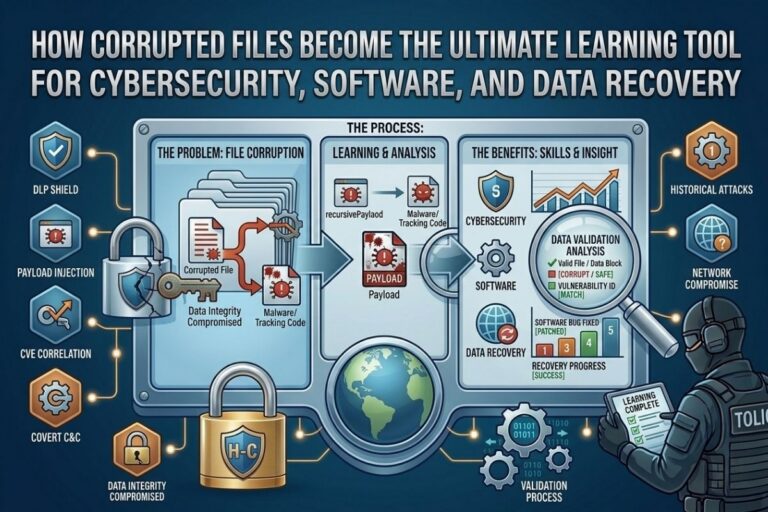
Corrupted Files are no longer viewed as simple digital accidents. In modern cybersecurity, software engineering, digital forensics, and data recovery, corrupted files have become powerful learning tools that help professionals understand system weaknesses, improve software resilience, strengthen recovery processes, and analyze how digital systems fail under pressure.
That matters more than most people realize.
In cybersecurity, failure teaches faster than perfection.
Corrupted Files force analysts, developers, forensic investigators, and security researchers to think differently. They expose weaknesses inside software applications, operating systems, storage devices, recovery tools, cloud infrastructure, and security controls that normal testing environments often fail to uncover.
Hackers understand this concept extremely well.
Cybercriminals frequently exploit malformed or intentionally corrupted files to:
- Trigger vulnerabilities
- Crash applications
- Deliver malware
- Bypass security protections
- Exploit memory handling flaws
That means understanding corrupted files is no longer optional for serious cybersecurity professionals.
It is a survival skill.
According to CISA and NIST, secure software development and vulnerability testing require continuous analysis of how systems behave under unexpected or malformed conditions.
Corrupted Files help expose those conditions directly.
What Are Corrupted Files?
Corrupted Files are files that become damaged, incomplete, altered, or structurally invalid in ways that prevent normal operation.
File corruption can occur because of:
- Hardware failure
- Malware infections
- Power outages
- Software crashes
- Disk errors
- Transmission failures
- Improper shutdowns
- Human error
Sometimes corruption happens accidentally.
Sometimes it is intentional.
Hackers often manipulate corrupted files to exploit weaknesses inside applications that improperly process malformed data.
That is where cybersecurity becomes extremely interesting.
Corrupted Files force systems into unpredictable states. Those states often reveal vulnerabilities developers never expected attackers to discover.
Image Steganography Tool
Hide or extract secret data inside images instantly.
Why Cybersecurity Professionals Study Corrupted Files
Cybersecurity professionals analyze Corrupted Files because malformed data frequently exposes weaknesses in software applications and operating systems.
Attackers constantly test how systems react when processing:
- Invalid file headers
- Malformed metadata
- Corrupted memory structures
- Oversized payloads
- Broken compression formats
- Unexpected file behavior
If software cannot safely handle corrupted input, vulnerabilities emerge.
That can lead to:
- Application crashes
- Remote code execution
- Privilege escalation
- Denial of service attacks
- Memory corruption
- Security bypasses
Corrupted Files effectively become weapons when attackers understand how to manipulate them properly.
That is why security researchers use corrupted files during:
- Fuzz testing
- Malware analysis
- Vulnerability research
- Reverse engineering
- Exploit development
- Secure software testing
The deeper analysts understand corrupted file behavior, the stronger defensive systems become.
📌 Recommended Reading
Staying Logged In Risks: How Sessions Get HijackedCorrupted Files and Malware Delivery
Hackers frequently weaponize corrupted files to bypass detection systems.
Malicious actors may disguise malware inside:
- Corrupted PDFs
- Damaged Office documents
- Malformed ZIP archives
- Broken image files
- Tampered executables
Why?
Because some security tools struggle to properly analyze malformed data structures.
Attackers understand that defensive systems often prioritize speed and automation. If corrupted files confuse scanners, attackers gain opportunity.
Cybercriminals exploit:
- Parser vulnerabilities
- File validation weaknesses
- Buffer overflows
- Improper memory handling
- Input validation failures
Corrupted Files become especially dangerous when applications trust incoming file structures without properly validating them first.
Hackers love software that assumes user input is safe.
That assumption creates vulnerabilities constantly.
How Corrupted Files Improve Software Development
Developers use Corrupted Files to test how software behaves under stress and failure conditions.
This process is critical because real world systems constantly encounter unexpected data.
Applications must safely handle:
- Invalid uploads
- Incomplete downloads
- Corrupted storage sectors
- Broken archives
- Damaged databases
- Unexpected input structures
If software crashes every time corrupted data appears, attackers eventually exploit that instability.
Corrupted Files help developers:
- Improve error handling
- Test application resilience
- Strengthen validation controls
- Prevent memory corruption
- Improve recovery mechanisms
- Harden software security
The strongest software systems are usually the ones tested aggressively against malformed data.
Failure reveals weaknesses.
Weaknesses reveal opportunities for improvement.
Data Recovery Experts Depend on Corrupted Files
Data recovery specialists constantly work with Corrupted Files because damaged digital storage environments are extremely common.
Storage failures happen because of:
- Hard drive damage
- SSD degradation
- File system corruption
- Malware attacks
- Physical device failure
- Accidental deletion
Recovery experts analyze corrupted structures to determine:
- What data remains intact
- What metadata survived
- Whether partial reconstruction is possible
- How severe the damage is
Corrupted Files become educational tools because every damaged structure tells a story about how systems fail.
Understanding those failures improves recovery strategies significantly.
That is why forensic analysts and recovery specialists spend years studying damaged data structures.
😄 Cyber Joke
Why do cybersecurity students love corrupted files?
Because every broken file comes with a surprise exam! 😄
Digital Forensics and Corrupted File Analysis
Digital forensic investigators analyze Corrupted Files during:
- Cybercrime investigations
- Malware incidents
- Insider threat cases
- Ransomware attacks
- Data breach analysis
Corrupted files often contain hidden evidence about:
- Attack methods
- Malware behavior
- File manipulation
- Timestamp tampering
- Data destruction attempts
Hackers sometimes intentionally corrupt files to destroy evidence or delay investigations.
Forensic analysts respond by learning how corruption patterns behave under different attack scenarios.
Corrupted Files become investigative puzzles.
The better analysts understand file corruption, the more effective digital investigations become.
Fuzz Testing and Vulnerability Discovery
One of the most important cybersecurity uses for Corrupted Files is fuzz testing.
Fuzz testing involves feeding applications malformed or corrupted input data to identify weaknesses.
Security researchers intentionally generate:
- Broken files
- Invalid structures
- Corrupted payloads
- Unexpected inputs
Then they observe system behavior.
If applications:
- Crash
- Freeze
- Leak memory
- Execute unintended behavior
researchers may have discovered exploitable vulnerabilities.
Many major vulnerabilities were discovered because malformed data exposed weaknesses developers overlooked.
Hackers perform this testing too.
The difference is intent.
Security researchers fix vulnerabilities.
Attackers weaponize them.
Why Hackers Exploit Corrupted File Structures
Hackers understand that file parsing is extremely complicated.
Modern applications process:
- Images
- Videos
- PDFs
- Archives
- Documents
- Databases
- Media files
Each file format contains complex rules and structures.
The more complexity involved, the greater the chance developers make mistakes.
Attackers manipulate corrupted structures to:
- Trigger memory corruption
- Exploit parsing flaws
- Bypass detection systems
- Execute malicious code
- Crash systems intentionally
Corrupted Files become dangerous when applications fail to properly validate incoming data.
That is why secure coding practices matter so much.
Corrupted Files and Cloud Security Risks
Cloud platforms process enormous amounts of uploaded content daily.
That creates another attack surface.
Hackers frequently test cloud applications using:
- Malformed uploads
- Corrupted archives
- Broken media files
- Invalid document structures
If cloud platforms improperly process corrupted input, vulnerabilities can emerge inside:
- Web applications
- Storage services
- File processing systems
- Automated scanning platforms
Corrupted Files help security teams identify these weaknesses before attackers exploit them.
Modern cloud security depends heavily on resilient file validation and secure processing pipelines.
How Organizations Defend Against Malformed File Attacks
Organizations should strengthen defenses against malicious or corrupted files by implementing layered security controls.
Important defenses include:
Input Validation
Validate all uploaded or processed files before execution.
Sandboxing
Analyze suspicious files inside isolated environments.
Endpoint Protection
Deploy security tools capable of detecting malformed file attacks.
Secure Software Development
Design applications to safely handle unexpected input.
Continuous Vulnerability Testing
Perform fuzz testing and malformed file analysis regularly.
Employee Security Awareness
Train users to recognize suspicious attachments and downloads.
Cybersecurity is about expecting attackers to abuse every possible weakness.
Corrupted Files are one of those weaknesses.
Why Corrupted Files Are Valuable Educational Tools
Corrupted Files teach professionals how systems behave when things go wrong.
That knowledge matters across:
- Cybersecurity
- Software engineering
- Digital forensics
- Malware analysis
- Incident response
- Data recovery
Perfect systems rarely reveal hidden weaknesses.
Failure does.
Corrupted Files expose the uncomfortable reality that many systems are far more fragile than organizations realize.
That is why cybersecurity professionals continue studying them aggressively.
The more defenders understand system failure, the harder it becomes for attackers to exploit it.
Final Thoughts
Corrupted Files have evolved far beyond simple digital accidents. They now serve as powerful educational tools for cybersecurity professionals, software developers, forensic investigators, and data recovery specialists working to understand how modern systems fail under pressure.
Hackers already study corrupted files extensively because malformed data often reveals exploitable weaknesses hidden deep inside software and infrastructure.
Defenders must understand those same weaknesses before attackers weaponize them.
At FileCorrupter.org, we break down cybersecurity realities, software vulnerabilities, hacker psychology, digital forensics, and offensive security concepts shaping the future of modern technology.
Because in cybersecurity, understanding failure is often the first step toward building stronger defenses.
Frequently Asked Questions
What are Corrupted Files?
Corrupted Files are damaged or malformed files that cannot function properly because of structural errors, missing data, malware activity, hardware failure, or software issues.
Why do cybersecurity professionals study Corrupted Files?
Cybersecurity professionals analyze Corrupted Files to identify vulnerabilities, improve software resilience, perform malware analysis, and strengthen defensive security systems.
Can Corrupted Files contain malware?
Yes. Attackers often weaponize corrupted or malformed files to exploit vulnerabilities, bypass security tools, and deliver malicious payloads.
What is fuzz testing?
Fuzz testing is a cybersecurity technique that feeds applications malformed or corrupted input data to discover crashes, vulnerabilities, and unexpected behavior.
Why are Corrupted Files useful for data recovery?
Corrupted Files help recovery specialists understand storage failures, reconstruct damaged data, analyze file structures, and improve digital recovery techniques.
Explore More Free Tools
Hash Generator Tool
Generate secure MD5, SHA1, SHA256, and other cryptographic hashes instantly online.
Open Tool →Dummy File Generator
Create sample dummy files of custom sizes for testing uploads, storage, and applications.
Open Tool →Password Strength Checker
Analyze password security and identify weak passwords before using them online.
Open Tool →File Hash Checker
Verify file integrity by checking MD5, SHA256, and other file hash signatures.
Open Tool →UUID Generator
Generate random UUIDs and unique identifiers instantly for apps, APIs, and databases.
Open Tool →Text Diff Checker
Compare two text blocks side by side and quickly detect additions, deletions, and edits.
Open Tool →