Most people assume that if a file opens successfully, everything is fine.
That assumption causes more problems than you might think.
A document can appear normal while containing corruption. A file can be modified without obvious signs. A transfer can fail silently. Sensitive information can be altered during storage, transmission, or handling without anyone noticing until the damage is already done.
For organizations, those mistakes can be expensive.
For individuals, they can be embarrassing.
For cybersecurity professionals, they can become serious security incidents.
This is why file integrity verification matters.
Before sharing contracts, financial records, legal documents, source code, research data, or confidential business information, verifying file integrity helps ensure the file you send is the file the recipient receives.
It sounds simple.
Yet it is one of the most overlooked security practices in modern digital communication.
What Is File Integrity Verification?
At its core, file integrity verification is the process of confirming that a file has not been altered, damaged, corrupted, or modified unexpectedly.
Think of it as a trust check.
When you verify file integrity, you are confirming that the content remains exactly as intended.
This process is commonly performed using cryptographic hashes, checksums, validation tools, and monitoring systems that compare a file’s current state against a trusted version.
If the values match, the file remains unchanged.
If they differ, something happened to the file.
That does not automatically mean malicious activity occurred.
Corruption, storage failures, software errors, and incomplete transfers can also affect file integrity.
The important thing is knowing before the file is used, shared, or trusted.
Why File Integrity Matters More Than Ever
Modern organizations exchange enormous amounts of data every day.
Documents move between cloud platforms, email systems, storage providers, collaboration tools, and business applications.
Every transfer introduces risk.
Most transfers work exactly as expected.
Some do not.
A damaged file may prevent a project from moving forward.
An altered document could create legal concerns.
A modified software package might introduce security risks.
A corrupted backup could become useless during an emergency.
The consequences vary, but the root problem remains the same.
People trusted a file without verifying it.
That trust gap is where problems begin.
How Files Become Corrupted
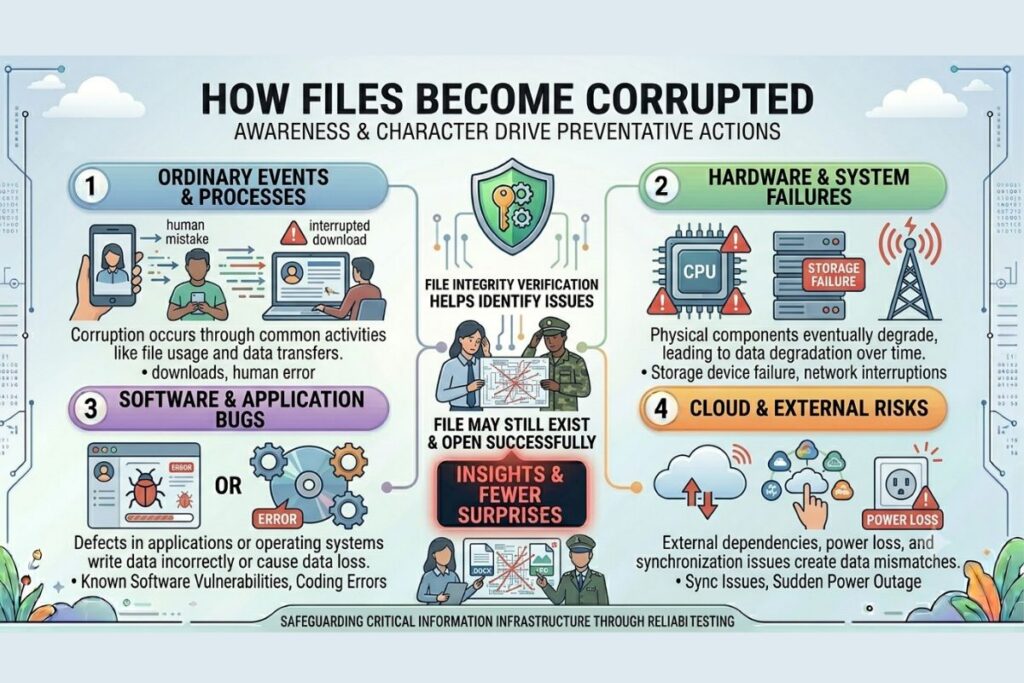
Many people associate file corruption with hackers.
In reality, corruption often occurs through ordinary events.
Storage devices eventually fail.
Network interruptions happen.
Downloads can be incomplete.
Software bugs appear.
Hardware experiences errors.
Cloud synchronization issues occur.
Human mistakes happen.
Any of these situations can alter a file unexpectedly.
The file may still exist.
It may even open successfully.
Yet the content could differ from the original version.
That is exactly why file integrity verification is valuable.
It helps identify issues that are not immediately visible.
Unauthorized Changes Are Not Always Obvious
One of the most dangerous assumptions in cybersecurity is believing that unauthorized changes will be easy to spot.
They often are not.
A single modified line in source code can introduce vulnerabilities.
A small change in a contract can alter legal obligations.
A hidden modification in a configuration file can affect system behavior.
A manipulated document can influence business decisions.
The most damaging changes are frequently the ones nobody notices.
File integrity verification helps remove uncertainty by providing a reliable method for confirming authenticity.
Instead of relying on assumptions, organizations can rely on evidence.
That difference is significant.
Also Read: The Dummy File Generator Developers Need
Hashes Play A Critical Role
When discussing file integrity verification, hashes are impossible to ignore.
A cryptographic hash converts file contents into a unique value.
Even a tiny modification produces a completely different result.
Use Our Free Tool: File Hash Checker
This makes hashes extremely useful for detecting changes.
For example, a software vendor may publish a hash alongside a downloadable file.
After downloading the file, users can generate their own hash and compare the values.
If the numbers match, the file remains intact.
If they do not, the file may have been altered, corrupted, or tampered with.
This simple verification process has become a standard security practice across many industries.
According to the official guidance available from the National Institute of Standards and Technology (NIST), cryptographic methods play an essential role in protecting data integrity and maintaining trust in digital systems.
Why Businesses Should Care
File integrity verification is not just a cybersecurity concern.
It is a business concern.
Organizations depend on accurate information.
Financial records must remain accurate.
Legal documents must remain unchanged.
Operational data must remain trustworthy.
Software releases must remain authentic.
When integrity fails, trust fails.
That can create compliance issues, operational disruptions, financial losses, and reputational damage.
Businesses invest heavily in protecting data from theft.
They should invest equal attention in ensuring data remains accurate and unchanged.
Protection and integrity work together.
One is incomplete without the other.
File Integrity Verification Supports Cybersecurity
Cybersecurity is often associated with firewalls, antivirus software, and threat detection tools.
Those technologies are important.
However, cybersecurity also depends on knowing whether information can be trusted.
A security team investigating an incident needs confidence in the evidence.
An administrator restoring backups needs confidence in the files.
A developer deploying software needs confidence in the release package.
Without integrity verification, confidence becomes guesswork.
The experts at Cybersecurity and Infrastructure Security Agency consistently emphasize the importance of protecting data integrity as part of a broader security strategy.
When integrity cannot be confirmed, risk increases dramatically.
Common Situations Where Verification Matters
File integrity verification becomes especially valuable in situations involving sensitive information.
Examples include:
- Sharing contracts and legal documents
- Transferring financial records
- Sending healthcare information
- Distributing software updates
- Moving source code repositories
- Exchanging research data
- Restoring backups
- Uploading files to cloud environments
In each case, accuracy matters.
The recipient needs confidence that the file received matches the file sent.
Verification provides that confidence.
Why People Skip This Step
The answer is surprisingly simple.
Most people assume nothing went wrong.
Modern technology creates an expectation that systems work perfectly.
Most of the time they do.
That success creates complacency.
When users rarely encounter corruption or modification issues, verification begins to feel unnecessary.
Until the day it is not.
The organizations that perform file integrity verification consistently are not paranoid.
They are prepared.
Preparation often looks excessive right up until the moment it becomes essential.
How FileCorrupter.org Helps Security Professionals
Understanding integrity starts with understanding failure.
Security teams, developers, and QA professionals often need to see how systems respond when files become damaged or corrupted.
That is where FileCorrupter.org provides value.
By generating corrupted test files, teams can evaluate detection mechanisms, validation controls, upload systems, storage processes, and security workflows.
Testing against failure scenarios helps strengthen confidence in success scenarios.
Reliable systems are rarely built through assumptions.
They are built through verification.
The Difference Between Trust And Proof
Trust is important.
Proof is better.
Many security failures occur because someone assumed a file was safe, authentic, or unchanged.
They never checked.
They never verified.
They simply trusted.
File integrity verification replaces assumptions with evidence.
That evidence allows individuals and organizations to make decisions with greater confidence.
In a world where digital information drives nearly everything, confidence matters.
So does verification.
Here is the curiosity punch line:
The file that causes the biggest problem is usually the one everyone assumed was fine.
Frequently Asked Questions
What is file integrity verification?
File integrity verification is the process of confirming that a file has not been altered, corrupted, damaged, or modified unexpectedly.
Why is file integrity verification important?
It helps ensure that files remain accurate, authentic, and trustworthy throughout storage, transfer, and usage.
How can I verify file integrity?
Common methods include cryptographic hashes, checksums, digital signatures, monitoring tools, and validation software.
Can file integrity verification improve cybersecurity?
Yes. It helps identify unauthorized changes, detect corruption, validate software authenticity, and strengthen overall security practices.
Final Thought
Most cybersecurity incidents begin with assumptions.
Someone assumes a file is safe.
Someone assumes a transfer completed successfully.
Someone assumes nothing changed.
Those assumptions can be costly.
File integrity verification is one of the simplest ways to reduce uncertainty and increase confidence. It helps organizations protect sensitive information, validate authenticity, and detect problems before they become serious incidents.
The next time you prepare to share an important document, ask yourself a simple question:
Do I know this file is intact, or do I merely believe it is?
The answer could matter more than you think.
Trust gets files shared. Verification keeps them trusted.
Explore More Free Tools
Hash Generator Tool
Generate secure MD5, SHA1, SHA256, and other cryptographic hashes instantly online.
Open Tool →Dummy File Generator
Create sample dummy files of custom sizes for testing uploads, storage, and applications.
Open Tool →Password Strength Checker
Analyze password security and identify weak passwords before using them online.
Open Tool →File Hash Checker
Verify file integrity by checking MD5, SHA256, and other file hash signatures.
Open Tool →UUID Generator
Generate random UUIDs and unique identifiers instantly for apps, APIs, and databases.
Open Tool →Text Diff Checker
Compare two text blocks side by side and quickly detect additions, deletions, and edits.
Open Tool →