
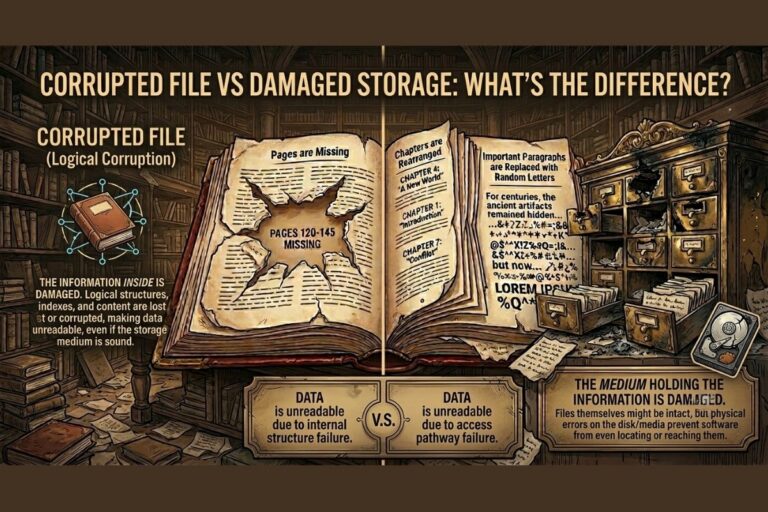
Imagine opening an important document only to see an error message saying the file is unreadable. In another scenario, an entire hard drive suddenly disappears from your computer. Both situations can lead to data loss, but they are not the same problem.
Understanding the difference between a corrupted file and damaged storage is essential for IT professionals, cybersecurity teams, students, businesses, and everyday users. The recovery approach, risk level, and long-term implications can differ dramatically.
In this guide, we’ll explain corrupted file vs damaged storage in plain English, explore real-world examples, examine cybersecurity implications, and provide practical steps to protect your data.
What Is a Corrupted File?
A corrupted file is a file whose contents, structure, or metadata have been altered in a way that prevents software from reading it correctly.
Examples include:
- A Word document that won’t open
- A ZIP archive showing extraction errors
- A photo that appears partially distorted
- A database file reporting integrity failures
Common causes of file corruption:
- Power outages during saving
- Software crashes
- Malware
- Interrupted downloads
- Faulty RAM
- File system errors

What Is Damaged Storage?
Damaged storage refers to a physical or logical failure of the storage device itself.
Examples include:
- Hard drive failure
- SSD controller failure
- Bad sectors
- USB drive damage
- SD card corruption
- RAID array failures
When a storage device fails, many files may become inaccessible at once, not just a single document.
Common symptoms of storage device failure:
- Drive not detected
- Clicking noises (HDDs)
- Frequent disk errors
- Extremely slow performance
- System freezes
- SMART warnings
Also Read: ZIP File Corruption Explained: Causes, Detection, and Recovery
Corrupted File vs Damaged Storage: The Key Difference
| Feature | Corrupted File | Damaged Storage |
|---|---|---|
| Scope | Usually one or a few files | Many or all files |
| Physical damage | Not necessarily | Often yes |
| Device detected? | Usually yes | Sometimes no |
| Recovery difficulty | Often moderate | Can be severe |
| Common cause | Software/data issues | Hardware failure |
| Risk of spreading | Limited | May worsen over time |
How File Corruption and Storage Failure Work
How File Corruption Happens
A file is stored as structured binary data. If part of that structure changes unexpectedly, the application may no longer understand the file.
Example:
- A ZIP archive loses its directory records.
- A database transaction is interrupted.
- A document header becomes damaged.
How Storage Failure Happens
Storage devices contain physical components and firmware.
Hard drives (HDDs) can suffer from:
- Mechanical wear
- Head crashes
- Bad sectors
- Motor failure
SSDs can suffer from:
- Flash memory wear
- Controller failure
- Firmware corruption
- Power-loss issues

Real-World Examples
Example 1: Corrupted Word Document
An employee saves a report during a power outage. The computer restarts, but only that document becomes unreadable. Other files work normally.
Diagnosis: Corrupted file.
Example 2: Failing Hard Drive
A business server begins showing disk errors, missing folders, and random file failures. SMART monitoring reports bad sectors.
Diagnosis: Damaged storage device.
Example 3: Ransomware Incident
Malware encrypts thousands of files while the storage hardware remains healthy.
Diagnosis: Widespread file corruption caused by a cybersecurity attack.
Industry Applications
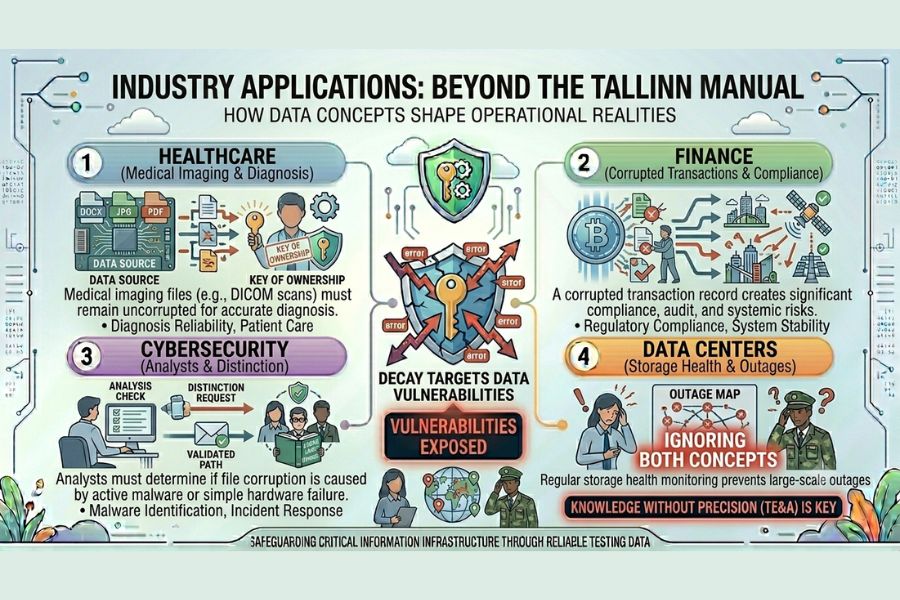
Cybersecurity Insights
Not all corruption is accidental.
Attackers may:
- Encrypt files with ransomware
- Modify archives
- Damage databases
- Corrupt backups
Security teams often use hash verification and file integrity monitoring to detect unauthorized changes.
Use Our Tools – Intentionally Corrupt Files
Risks and Challenges
Corrupted File Risks
- Loss of individual documents
- Application errors
- Data inconsistency
- Archive extraction failures
Damaged Storage Risks
- Large-scale data loss
- Business downtime
- Backup failures
- System outages
- Expensive recovery operations
Prevention and Best Practices
Prevent File Corruption
- Save files regularly
- Use reliable software
- Protect against malware
- Verify downloads
- Use a UPS for critical systems
Prevent Storage Failure
- Monitor SMART health
- Replace aging drives
- Maintain backups
- Avoid overheating
- Use enterprise-grade storage where appropriate
Common Mistakes
- Ignoring disk warning messages
- Continuing to use a failing drive
- Operating without backups
- Force-shutting down computers repeatedly
- Downloading files from untrusted sources
- Assuming all unreadable files indicate hardware failure
FAQs
How do I know if I have a corrupted file or a damaged hard drive?
If only one or a few files fail while the drive works normally, it’s likely file corruption. If many files fail and the drive shows errors, it may be damaged storage.
Can a damaged SSD cause file corruption?
Yes. A failing SSD can produce corrupted data, unreadable files, and file system errors.
Can corrupted files be repaired?
Sometimes. Recovery depends on the file type and the extent of corruption.
Is storage failure always physical damage?
No. Firmware issues and file system corruption can also make storage devices appear damaged.
The difference between a corrupted file and damaged storage is primarily scope and cause.
- File corruption usually affects individual files and often results from software issues, interrupted writes, malware, or data errors.
- Storage device failure affects the underlying hardware or storage medium and can make many files inaccessible simultaneously.
Correctly identifying the problem is critical because the recovery strategy for a corrupted document is very different from the strategy for a failing hard drive or SSD.
Learn More with FileCorrupter.org
FileCorrupter.org provides educational resources, research-driven guides, and practical tools for understanding file corruption, storage corruption, digital file behavior, cybersecurity risks, and data integrity issues.
Whether you’re investigating corrupted files explained, diagnosing storage device errors, or learning about data recovery techniques, FileCorrupter.org offers valuable insights into how digital data fails, how corruption is detected, and how recovery strategies work in real-world environments.