
Modern businesses and individuals rely heavily on digital files. From financial records and databases to photos, videos, and critical business documents, data has become one of the world’s most valuable assets. Yet millions of files become inaccessible every year due to file corruption.
Whether you’ve encountered an error saying a document cannot be opened, a video refuses to play, or a database suddenly crashes, file corruption is often the hidden culprit.
Understanding the causes of file corruption is essential for preventing data loss, improving cybersecurity, and maintaining long-term data integrity.
In this guide, we’ll explore the 15 most common reasons files become unreadable, how corruption occurs, real-world examples, and practical steps to protect your data.
What Is File Corruption?
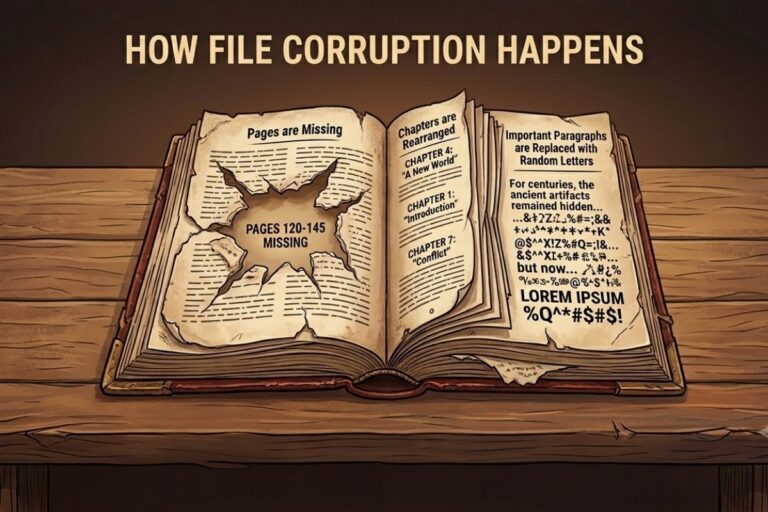
File corruption occurs when the structure, contents, or metadata of a file become damaged or altered in a way that prevents software from reading it correctly.
A corrupted file may:
- Refuse to open
- Display error messages
- Show missing or distorted content
- Crash associated applications
- Become partially readable
- Appear as zero bytes in size
In simple terms, file corruption means the information stored inside a file no longer matches what the operating system or application expects.
How File Corruption Happens
Every file consists of binary data organized in a specific format.
For example:
- PDF files follow PDF standards
- DOCX files use structured XML archives
- JPEG images contain image headers and compressed pixel data
- ZIP files maintain directory records and checksums
When any part of this structure is altered unexpectedly, software may no longer understand the file.

15 Common Reasons Files Become Unreadable
1. Sudden Power Loss
Unexpected power outages remain one of the leading causes of file corruption.
If a file is being saved while power is interrupted:
- Writes may remain incomplete
- Metadata may become inconsistent
- File allocation tables can be damaged
Real-World Example
An employee saves an Excel spreadsheet during a power failure. When reopened, the file reports that its contents are unreadable.
Also Read: The Most Valuable Thing You Own Cannot Be Locked Away
2. Improper System Shutdown
Forcefully shutting down a computer can interrupt active disk operations.
Common scenarios include:
- Holding the power button
- Battery depletion
- System freezes requiring hard resets
This can leave files partially written to storage.
3. Storage Device Failure
Hard drives and SSDs eventually wear out.
Signs include:
- Bad sectors
- Read/write errors
- Slow performance
- Clicking noises (HDDs)
As storage hardware deteriorates, file corruption becomes increasingly likely.
Industry Impact
Data centers continuously monitor storage health because failing drives are responsible for significant amounts of enterprise data loss.
4. Malware and Ransomware
Cybercriminals frequently target files.
Malicious software can:
- Modify file contents
- Encrypt data
- Delete metadata
- Corrupt system files
Cybersecurity Insight
Many ransomware attacks intentionally corrupt files during encryption, making recovery difficult without backups.
5. Software Bugs
Applications occasionally contain coding errors.
A bug may:
- Save invalid data
- Write incomplete files
- Damage file structures
Even trusted software can introduce corruption under specific conditions.
6. Faulty RAM (Memory Errors)
Before data reaches storage, it passes through system memory.
Defective RAM can:
- Alter data in transit
- Introduce random bit errors
- Corrupt files before saving
This issue is particularly dangerous because users often blame storage devices rather than memory hardware.
7. Operating System Crashes
Blue screens, kernel panics, and operating system failures can interrupt active file operations.
When the system crashes during:
- Saving documents
- Updating databases
- Installing software
corruption risks increase significantly.
8. Bad Sectors on Hard Drives
Bad sectors are damaged portions of storage media that can no longer reliably store data.
If critical file components reside in these sectors:
- Files become partially unreadable
- Entire documents may fail to open
Older hard drives are especially vulnerable.
Use Our Tools – Intentionally Corrupt Files Online
Need to test file recovery software, upload validation systems, backup procedures, or error-handling workflows? Use our free online tools to intentionally corrupt files for testing and educational purposes.
Corrupt Video File Online
Intentionally damage MP4, AVI, MOV, MKV, and other video files to test media players, recovery tools, streaming platforms, and error handling systems.
Open Tool →Corrupt ZIP File Online
Create corrupted ZIP archives for software testing, archive validation, backup verification, cybersecurity training, and recovery experiments.
Open Tool →9. Interrupted File Transfers
Network disruptions frequently cause corrupted downloads and uploads.
Common examples:
- Internet connection drops
- USB transfer interruptions
- Cloud synchronization failures
Example
A large ZIP archive downloaded over an unstable connection may appear complete but fail extraction due to missing data blocks.
10. Unsafe USB Device Removal
Removing USB drives without ejecting them properly can interrupt pending write operations.
Consequences include:
- Corrupted files
- Damaged partitions
- Lost directory entries
This remains one of the most common causes of removable media corruption.
11. File System Errors
File systems manage how data is stored and retrieved.
Examples include:
- NTFS
- FAT32
- exFAT
- ext4
Corruption within the file system itself can make otherwise healthy files inaccessible.
12. Virus-Infected Downloads
Not all corruption originates locally.
Downloading infected files may introduce:
- Malicious modifications
- Hidden payloads
- Structural damage
Cybersecurity teams routinely analyze suspicious files for evidence of tampering.
13. Application Conflicts
Multiple programs accessing the same file simultaneously can create inconsistencies.
This is common with:
- Shared documents
- Network databases
- Collaborative editing systems
Improper locking mechanisms can result in damaged files.
14. Human Error
Accidental actions remain a major cause of data integrity issues.
Examples include:
- Editing binary files manually
- Renaming extensions incorrectly
- Interrupting updates
- Overwriting important files
Many corruption incidents are preventable with proper training.
15. Aging Storage Media
Storage devices degrade over time.
Affected media include:
- Hard drives
- SSDs
- USB drives
- SD cards
- Optical discs
As components wear out, data retention becomes less reliable.
Comparison Table: Common Causes of File Corruption
| Cause | Risk Level | Typical Impact | Preventable? |
|---|---|---|---|
| Power Outages | High | Incomplete writes | Yes |
| Malware | High | File modification | Yes |
| Storage Failure | High | Data loss | Partially |
| Bad Sectors | High | Read errors | Partially |
| Software Bugs | Medium | Invalid files | Partially |
| Faulty RAM | Medium | Silent corruption | Yes |
| USB Removal | Medium | Incomplete writes | Yes |
| File Transfer Errors | Medium | Missing data | Yes |
| Human Error | Medium | Accidental damage | Yes |
| Aging Media | Medium | Data degradation | Partially |
Real-World Examples of File Corruption
Microsoft Office Document Recovery
Many organizations experience corrupted Word and Excel files due to unexpected shutdowns or interrupted cloud synchronization.
Database Corruption Incidents
Businesses using transactional databases occasionally encounter corruption after storage subsystem failures, resulting in downtime and recovery operations.
Ransomware Attacks
Major ransomware campaigns have rendered thousands of corporate files inaccessible by encrypting or intentionally damaging critical data structures.
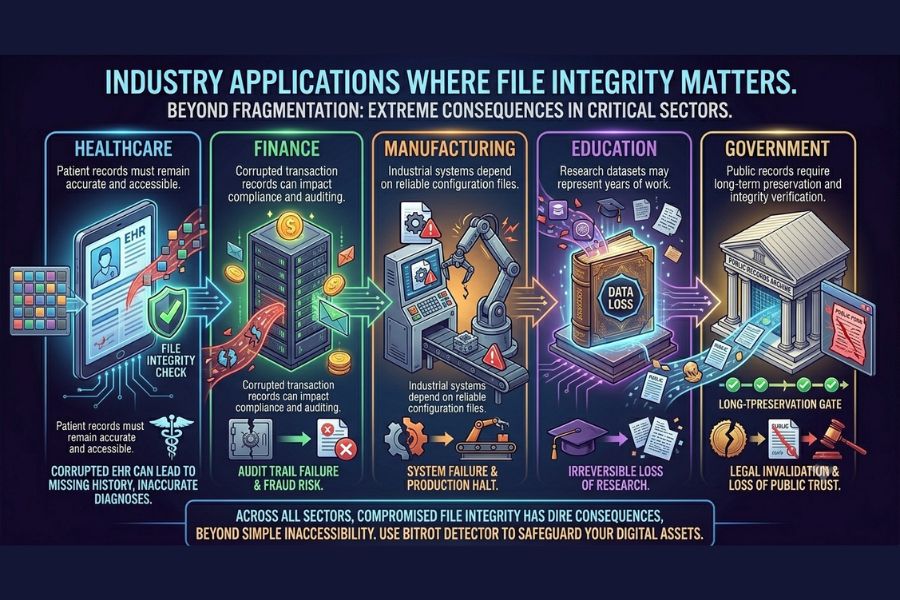
Industry Applications Where File Integrity Matters
Risks and Challenges
File corruption can lead to:
- Permanent data loss
- Business disruption
- Regulatory compliance issues
- Financial losses
- Operational downtime
- Security incidents
For organizations, the cost often extends beyond the file itself, affecting productivity and customer trust.
Prevention and Best Practices
Maintain Regular Backups
Follow the 3-2-1 backup rule:
- 3 copies of data
- 2 storage types
- 1 offsite copy
Use Reliable Storage Hardware
Monitor:
- SMART drive statistics
- SSD health indicators
- Disk error logs
Install Cybersecurity Protection
Use:
- Antivirus solutions
- Endpoint detection tools
- Regular patch management
Shut Down Systems Properly
Avoid forceful shutdowns whenever possible.
Use Uninterruptible Power Supplies (UPS)
A UPS provides critical protection against sudden power failures.
Verify Downloads
Checksums and hash verification help identify corrupted transfers.
Safely Remove External Drives
Always eject storage devices before disconnecting them.
Common Mistakes That Increase Corruption Risk
- Ignoring disk warnings
- Delaying hardware replacement
- Operating without backups
- Downloading files from untrusted sources
- Disabling security software
- Using damaged USB drives
- Interrupting updates and installations
FAQs
What is the most common cause of file corruption?
Unexpected power loss and improper shutdowns are among the most common causes because they interrupt active write operations.
Can corrupted files be repaired?
Sometimes. Recovery depends on the severity of corruption and whether backup copies or repair utilities are available.
Can malware corrupt files?
Yes. Many forms of malware modify, encrypt, delete, or damage file structures.
How can I check if a file is corrupted?
Common indicators include error messages, failed openings, missing content, unusual file sizes, and checksum mismatches.
File corruption occurs when data structures become damaged, altered, or incomplete, making files unreadable. Common causes include power outages, hardware failures, malware infections, software bugs, interrupted transfers, and human error.
Understanding why files become unreadable allows individuals and organizations to implement effective prevention strategies, reduce downtime, and maintain data integrity.
By combining reliable backups, cybersecurity controls, healthy storage devices, and proper operational practices, most file corruption incidents can be avoided before they result in significant data loss.
Learn More About File Corruption
At FileCorrupter.org, we explore the technical causes of file corruption, digital file behavior, cybersecurity risks, and data integrity challenges. Whether you’re studying how corrupted files behave, testing software resilience, or learning about digital storage reliability, FileCorrupter.org provides educational resources and tools that help users better understand the mechanisms behind file corruption and recovery scenarios.
Understanding the causes of file corruption is the first step toward protecting valuable data and building more resilient digital systems.
Explore More Free Tools
Hash Generator Tool
Generate secure MD5, SHA1, SHA256, and other cryptographic hashes instantly online.
Open Tool →Dummy File Generator
Create sample dummy files of custom sizes for testing uploads, storage, and applications.
Open Tool →Password Strength Checker
Analyze password security and identify weak passwords before using them online.
Open Tool →File Hash Checker
Verify file integrity by checking MD5, SHA256, and other file hash signatures.
Open Tool →UUID Generator
Generate random UUIDs and unique identifiers instantly for apps, APIs, and databases.
Open Tool →Text Diff Checker
Compare two text blocks side by side and quickly detect additions, deletions, and edits.
Open Tool →