
ZIP files are among the most widely used file formats for storing and transferring data. They reduce file sizes, bundle multiple files into a single archive, and simplify sharing across devices and networks. Yet despite their popularity and reliability, ZIP archives are not immune to corruption.
Few situations are more frustrating than downloading an important archive, attempting to extract it, and being greeted with an error message stating that the archive is invalid, damaged, or unreadable. Whether it involves business documents, software packages, digital evidence, research datasets, or personal backups, a corrupted ZIP file can quickly become a serious problem.
Understanding how ZIP archive corruption occurs, how it can be detected, and what recovery options are available can help minimize data loss and improve long-term file integrity.
What Is ZIP File Corruption?
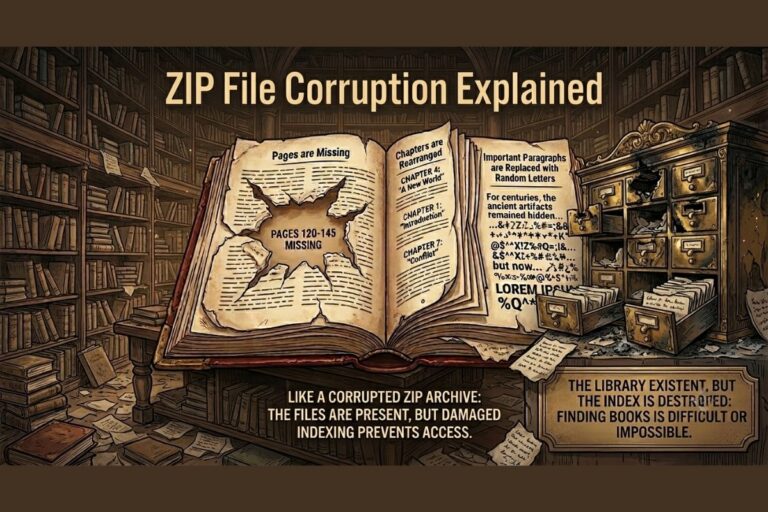
ZIP file corruption occurs when the internal structure of a ZIP archive becomes damaged, altered, incomplete, or inconsistent, preventing extraction software from properly reading its contents.
A damaged ZIP file may produce errors such as:
- ZIP file unreadable
- Unexpected end of archive
- Invalid compressed folder
- CRC (Cyclic Redundancy Check) failure
- ZIP extraction error
- Archive is corrupt
- Cannot open compressed file
In technical terms, ZIP archives contain multiple components including:
- File headers
- Central directory records
- Compression metadata
- Checksums
- Compressed file streams
If any of these components become damaged, the archive may no longer function correctly.
How ZIP Archive Corruption Works
To understand ZIP archive corruption, it helps to understand how ZIP files are structured.
A ZIP archive contains:
- Compressed file data
- Metadata describing each file
- A central directory used to locate files
- Integrity validation information
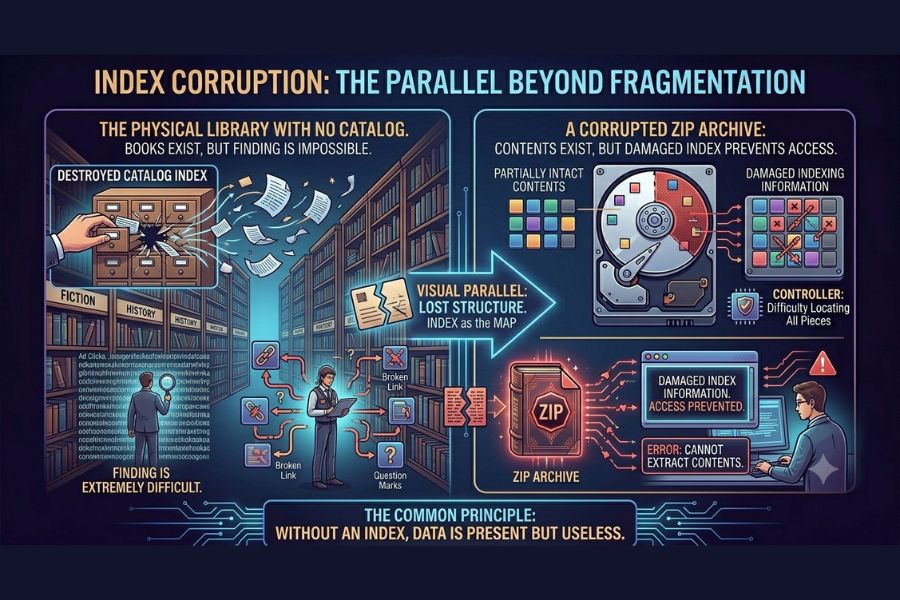
When extraction software opens a ZIP archive, it reads the central directory first. If this directory is damaged or missing, the software may be unable to locate files even if the compressed data still exists.
Common Causes of ZIP File Corruption
1. Interrupted Downloads
One of the most common causes of ZIP file corruption is an incomplete download.
If a network connection drops during transfer:
- Archive data may be missing
- Headers may become incomplete
- File sizes may not match expected values
This frequently results in ZIP file damaged after download errors.
Also Read: What Causes File Corruption? 15 Common Reasons Files Become Unreadable
2. Storage Device Failures
Failing hard drives, SSDs, USB drives, and memory cards can introduce archive corruption through:
- Bad sectors
- Read/write errors
- Data degradation
Even a single corrupted sector can affect an entire ZIP archive.
3. Malware and Cyberattacks
Cybercriminals often target compressed archives because they are commonly used for:
- Software distribution
- Data transfers
- Backup storage
Malware may intentionally modify archive structures, resulting in broken ZIP archives and data corruption in ZIP files.
4. Power Failures During Compression
Creating a ZIP archive requires multiple write operations.
Unexpected power loss during archive creation can leave:
- Incomplete central directories
- Missing file entries
- Corrupted metadata
5. Faulty File Transfer Processes
ZIP file errors often occur during:
- FTP uploads
- Cloud synchronization
- Network file transfers
- External drive copying
Incomplete transfers frequently produce unreadable ZIP files.
6. Software Bugs
Compression software occasionally contains bugs that create malformed archives.
Although uncommon, application defects can generate ZIP archive corruption even when hardware functions normally.
Use Our Tools – Intentionally Corrupt Files Online
Need to test file recovery software, upload validation systems, backup procedures, or error-handling workflows? Use our free online tools to intentionally corrupt files for testing and educational purposes.
Corrupt Video File Online
Intentionally damage MP4, AVI, MOV, MKV, and other video files to test media players, recovery tools, streaming platforms, and error handling systems.
Open Tool →Corrupt ZIP File Online
Create corrupted ZIP archives for software testing, archive validation, backup verification, cybersecurity training, and recovery experiments.
Open Tool →Detecting a Corrupted ZIP File
Identifying ZIP file integrity problems early can prevent larger issues.
Common warning signs include:
Extraction Failures
Software displays errors during decompression.
Missing Files
Some files extract successfully while others disappear.
CRC Errors
CRC checks verify file integrity.
A mismatch indicates archive corruption or altered data.
Unexpected File Sizes
Extracted files may appear significantly smaller or larger than expected.
Antivirus Alerts
Security software may detect suspicious archive behavior that indicates corruption or tampering.
Real-World Examples of ZIP Archive Corruption
Software Distribution Failure
A software vendor uploads a 2 GB application package.
A network interruption during upload leaves the ZIP archive incomplete. Thousands of users encounter ZIP extraction errors before the issue is identified.
Digital Forensics Investigation
During a forensic acquisition, investigators discover that archived evidence files fail integrity verification due to storage corruption.
Because hash validation was performed, the corruption is detected before evidence analysis begins.
Enterprise Backup Incident
A business stores monthly backups in compressed archives.
Several archives become unreadable after a failing storage device develops bad sectors, requiring restoration from secondary backups.
Industry Applications Where ZIP Integrity Matters
Cybersecurity
Analysts frequently exchange malware samples and forensic artifacts using ZIP archives.
Software Development
Developers distribute applications and source code through compressed archives.
Legal and Compliance
Organizations archive sensitive records for long-term retention.
Healthcare
Medical imaging and records are often compressed for storage and transfer.
Education and Research
Research datasets frequently rely on ZIP compression for distribution and preservation.
Risks and Challenges of ZIP Archive Corruption
ZIP archive corruption can create significant challenges:
- Permanent data loss
- Business disruption
- Failed software deployments
- Lost research data
- Backup recovery failures
- Regulatory compliance issues
For organizations managing large data volumes, archive corruption can impact both operational efficiency and long-term data preservation efforts.
Comparison Table: Common ZIP File Corruption Scenarios
| Cause | Typical Symptoms | Recovery Difficulty |
|---|---|---|
| Interrupted Download | Extraction failure | Easy |
| Power Loss | Missing directory entries | Medium |
| Storage Failure | CRC errors | High |
| Malware Damage | Altered archive structure | High |
| Network Transfer Issues | Partial extraction | Medium |
| Software Bugs | Invalid archive format | Medium |
| Bad Sectors | Missing data blocks | High |
ZIP File Recovery and Repair Methods
Verify File Size
Compare the downloaded archive size with the original source.
An incomplete archive often indicates transfer problems.
Re-download the Archive
If corruption occurred during transfer, obtaining a fresh copy is often the simplest solution.
Use ZIP File Repair Tools
Many ZIP file repair tools can rebuild:
- Central directories
- Archive indexes
- Metadata structures
These tools may recover partially damaged archives.
Extract Healthy Files
Some archive utilities allow extraction of undamaged files even when portions of the archive remain corrupted.
Restore from Backups
Organizations should always maintain backup copies of critical archives.
Validate Checksums
Hash verification helps identify whether archive contents have changed since creation.
Prevention and Best Practices
Reducing ZIP file corruption requires a proactive approach.
Use Reliable Storage Devices
Monitor drive health and replace aging hardware.
Verify Downloads
Compare checksums whenever available.
Maintain Backups
Follow the 3-2-1 backup strategy.
Protect Against Malware
Use updated antivirus and endpoint security solutions.
Safely Remove External Drives
Improper removal can damage active archives.
Avoid Interruptions During Compression
Ensure stable power and system operation while creating archives.
Monitor Data Integrity
Regular validation helps detect archive corruption before it becomes critical.
Common Mistakes That Cause ZIP File Errors
- Ignoring download failures
- Storing archives on failing media
- Disabling integrity verification
- Using outdated compression software
- Skipping backups
- Assuming successful transfers without validation
- Opening suspicious archives from untrusted sources
FAQs
What causes ZIP file corruption?
The most common causes of ZIP file corruption include interrupted downloads, storage device failures, malware infections, power outages, and incomplete file transfers.
Can a corrupted ZIP file be repaired?
In many cases, yes. ZIP file repair tools can rebuild damaged archive structures and recover accessible files.
Why does a ZIP file show a CRC error?
A CRC error indicates that stored data no longer matches the expected integrity value, often due to corruption or modification.
How can I recover a corrupted ZIP file?
You can recover corrupted ZIP files by re-downloading the archive, using ZIP file recovery software, extracting intact files, or restoring from backups.
ZIP file corruption occurs when archive structures, metadata, or compressed data become damaged, making extraction difficult or impossible. Common causes include interrupted downloads, hardware failures, malware, power disruptions, and transfer errors.
By understanding ZIP file corruption explained from both technical and practical perspectives, users can better protect their data, identify corruption early, and implement effective ZIP file recovery strategies.
Reliable backups, checksum validation, secure storage practices, and proper cybersecurity controls remain the most effective defenses against archive corruption and data loss.
Learn More with FileCorrupter.org
FileCorrupter.org provides educational resources, research-driven guides, and practical tools for understanding file corruption, digital file behavior, ZIP archive corruption, cybersecurity risks, and data integrity challenges. Whether you’re studying compressed file corruption, testing application resilience, or learning about archive recovery techniques, FileCorrupter.org offers valuable insights into how digital files fail, how corruption is detected, and how recovery methods work in real-world environments.
Image Steganography Tool
Hide or extract secret data inside images instantly.